
WP Engine is one of the most recognized names in managed WordPress hosting. It is not built for people who only want the cheapest hosting plan possible.
It is built for website owners, agencies, stores, publishers, and growing businesses that want faster WordPress performance, stronger security, expert support, and fewer technical headaches.
The biggest question is simple: is WP Engine worth paying more for?
For some users, yes. For others, no.
If you run a small personal blog with low traffic, WP Engine may feel expensive. But if your website brings leads, sales, affiliate income, bookings, or client revenue, managed hosting can make more sense.
WP Engine gives you a WordPress focused platform with built in caching, daily backups, staging tools, CDN, SSL, security scans, developer tools, and support from people who understand WordPress.
This WP Engine review covers pricing, features, pros, cons, performance, support, alternatives, and who should use it.
What Is WP Engine?
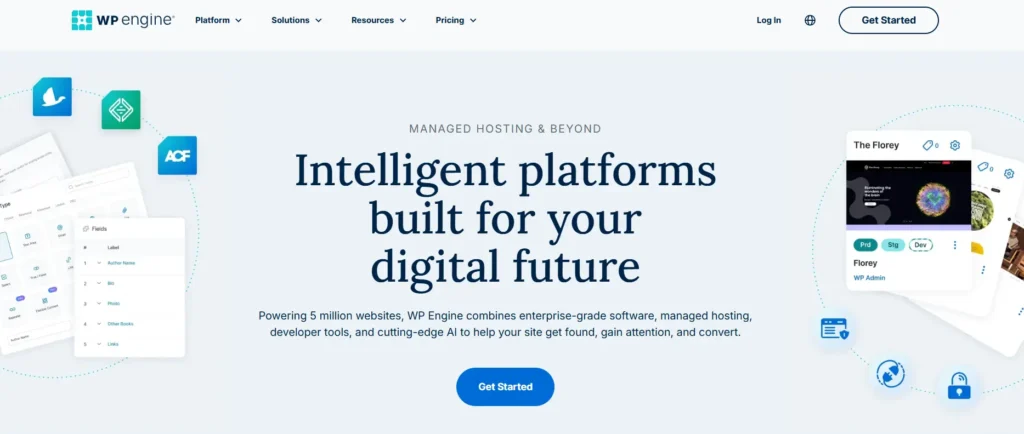
WP Engine is a managed hosting platform made specifically for websites built on WordPress. Unlike general shared hosting, WP Engine focuses only on WordPress performance, security, updates, backups, and site management.
That means you are not just renting server space. You are paying for a managed environment where many technical tasks are handled for you.
WP Engine is used by bloggers, ecommerce stores, agencies, SaaS brands, publishers, course creators, affiliate sites, and business websites. It also supports developers with staging environments, SSH access, GitHub deployment options, transferable sites, and local development tools.
The platform is best known for three things:
| Area | What WP Engine Focuses On |
|---|---|
| Speed | EverCache, CDN, optimized WordPress hosting |
| Security | SSL, DDoS protection, plugin risk scans, backups |
| Workflow | Staging, dev environments, client handoff, backups |
WP Engine is not the cheapest WordPress host, but it is designed for people who want managed WordPress hosting with stronger reliability and support.
WP Engine Pricing 2026
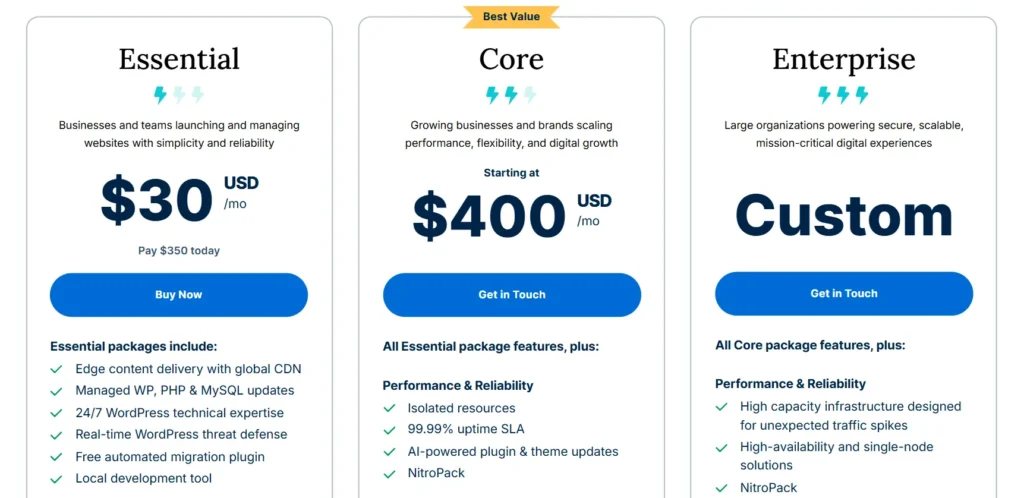
WP Engine pricing starts at $30 per month for the Startup plan. The main plans are Startup, Professional, Growth, Scale, and Core Hosting.
Here is the current WP Engine pricing table.
| WP Engine Plan | Starting Price | Websites | Monthly Visits | Storage | Bandwidth | Support |
|---|---|---|---|---|---|---|
| Startup | $30 per month | 1 site | 25,000 visits | 10 GB | 75 GB | Chat only |
| Professional | $55 per month | 3 sites | 75,000 visits | 15 GB | 150 GB | Chat and phone |
| Growth | $109 per month | 10 sites | 100,000 visits | 20 GB | 240 GB | Chat and phone |
| Scale | $276 per month | 30 sites | 400,000 visits | 50 GB | 550 GB | Chat and phone |
| Core Hosting | $400 per month | Custom | Custom | Custom | Custom | Chat and phone |
Pricing can change based on billing term, country, taxes, add ons, and first year promotions. WP Engine also states that overages may apply during checkout, so you should check the final cart price before buying.
Startup Plan
The Startup plan is best for one small website, blog, portfolio, or business site. It includes 1 website, 25,000 monthly visits, 10 GB storage, and 75 GB bandwidth.
This plan gives you the core WP Engine experience, including managed WordPress hosting, daily backups, SSL, SSH access, EverCache, CDN, staging, and security tools.
The main limitation is support. Startup includes chat support, but phone support starts from the Professional plan.
Professional Plan
The Professional plan costs $55 per month and supports 3 websites. It includes 75,000 monthly visits, 15 GB storage, and 150 GB bandwidth.
This is a better fit for small businesses, consultants, service brands, and site owners managing more than one website. It also adds phone support, which makes it more useful for users who want faster help during urgent issues.
Growth Plan
The Growth plan costs $109 per month and supports 10 websites. It includes 100,000 monthly visits, 20 GB storage, and 240 GB bandwidth.
This plan is suitable for agencies, growing affiliate sites, content websites, and businesses that manage several WordPress projects. It is also a practical option if you need more room but do not want to move into a higher enterprise style plan.
Scale Plan
The Scale plan costs $276 per month and supports 30 websites. It includes 400,000 monthly visits, 50 GB storage, and 550 GB bandwidth.
This is more useful for agencies, high traffic websites, growing publishers, and businesses with multiple client or brand sites. It costs more, but the per site cost can become reasonable if you are hosting many active websites.
Core Hosting
Core Hosting starts at $400 per month and is made for optimized performance with more advanced needs. It uses isolated resources instead of the shared environment used by the Essential plans.
This plan is better for larger businesses, high traffic sites, ecommerce operations, and teams that need stronger hosting architecture.
WP Engine Features Table
| Feature | Included With WP Engine |
|---|---|
| Managed WordPress hosting | Yes |
| Free SSL | Yes |
| SSH access | Yes |
| Daily backups | Yes |
| On demand backups | Yes |
| Backup retention | Up to 40 days |
| CDN | Yes, powered by Cloudflare |
| Staging environment | Yes |
| Development environment | Yes |
| EverCache | Yes |
| WordPress updates | Yes |
| PHP updates | Yes |
| Security patching | Yes |
| Plugin risk scans | Yes |
| Layer 3 and 4 DDoS protection | Yes |
| Premium themes | 10 included |
| Genesis blocks | Included |
| Transferable sites | Yes |
| Multisite support | Paid add on, not available on Startup |
| Phone support | Professional plan and above |
| Extra site add on | $20 per month |
Main WP Engine Features Explained
1. Managed WordPress Hosting
WP Engine is not regular shared hosting. It is a managed WordPress platform. This means the hosting setup is optimized for WordPress websites, and many technical tasks are handled at the platform level.
You get automatic backups, WordPress focused support, caching, staging, security tools, and performance monitoring options. This is useful for users who do not want to manage server level work themselves.
2. EverCache Performance System
EverCache is WP Engine’s built in caching technology. It is designed to help WordPress pages load faster by reducing the amount of work needed to serve repeat requests.
Caching is one of the biggest reasons managed WordPress hosts feel faster than cheap shared hosting. A slow website can hurt conversions, user experience, and search performance. WP Engine gives you this performance layer without needing to build a complex caching stack yourself.
3. Cloudflare CDN
WP Engine includes a global CDN powered by Cloudflare. A CDN stores copies of site assets across different locations, so visitors can load files from a closer server.
This is helpful if your audience comes from different countries or regions. For example, if your site gets traffic from the United States, India, the United Kingdom, Canada, and Australia, CDN support can improve loading speed for more visitors.
4. Daily and On Demand Backups
WP Engine automatically backs up your website every day. You can also create manual backups before making changes.
This is very useful before updating plugins, editing themes, changing code, or testing a new design. If something breaks, you can restore an earlier backup.
WP Engine offers backup retention of up to 40 days, which is stronger than many budget hosts.
5. Staging and Development Environments
WP Engine includes staging and development environments. This means you can test changes before pushing them to your live website.
For example, you can test a new plugin, redesign a landing page, update WooCommerce, or change your theme without risking your live site.
This is one of the most useful features for agencies, developers, and serious website owners.
6. WordPress and PHP Updates
WP Engine helps with WordPress and PHP updates. Keeping WordPress updated is important for security and performance, but updates can sometimes break plugins or theme features.
A managed platform reduces this burden. You still need to review your website after major changes, but WP Engine makes the process easier than unmanaged hosting.
7. Security Tools
WP Engine includes SSL, security patching, plugin risk scans, DDoS protection, and platform level security monitoring.
For business websites, security is not optional. A hacked website can lead to lost revenue, traffic drops, customer trust issues, and cleanup costs.
WP Engine is not a replacement for smart security practices, but it gives you a stronger base than many cheap hosting plans.
8. Developer Friendly Tools
WP Engine is also good for developers. You get SSH access, GitHub Actions deployment, staging, development environments, transferable sites, and local development support.
Agencies can build a site, stage it, and transfer it to a client account. This makes client work cleaner and easier to manage.
9. Premium Themes and Genesis Blocks
WP Engine includes 10 premium themes and Genesis blocks. This can help beginners or agencies create websites faster.
You do not have to use these themes, but having them included adds value if you want a clean starting point for a WordPress project.
10. WordPress Expert Support
WP Engine offers WordPress focused support. Startup users get chat support. Professional, Growth, Scale, and Core Hosting users get chat and phone support.
This matters because general hosting support teams often handle many platforms. WP Engine support is more focused on WordPress hosting, which can save time when you are dealing with plugin issues, performance problems, redirects, caching, or migration questions.
WP Engine Pros and Cons
Pros
• Strong managed WordPress hosting platform
• Built in caching with EverCache
• Global CDN included
• Daily and on demand backups
• Up to 40 days backup retention
• Free SSL and SSH access
• Staging and dev environments included
• Good for agencies and developers
• WordPress focused support
• Security patching and plugin risk scans
• Premium themes included
• Scales from small sites to larger business sites
Cons
• More expensive than shared hosting
• Startup plan has chat support only
• Email hosting is not included
• Domain registration is not the main focus
• Some advanced security and update tools are add ons
• Visit and bandwidth limits may matter for high traffic sites
• Not the best choice for very small hobby blogs
• Multisite is not available on Startup
WP Engine Performance Review
WP Engine is built for performance, especially for WordPress websites. The platform uses WordPress optimized caching, Cloudflare CDN, modern cloud infrastructure, and managed updates.
For most business websites, WP Engine should feel faster and more stable than cheap shared hosting. The biggest performance benefits come from caching, CDN, optimized server settings, and better resource management.
That said, hosting is only one part of website speed. A heavy theme, too many plugins, large images, bad scripts, and bloated page builders can still slow down your website.
WP Engine gives you a strong base, but you still need to keep your WordPress site clean.
A good setup would include:
| Speed Area | Best Practice |
|---|---|
| Images | Compress and resize before upload |
| Plugins | Use only what you need |
| Theme | Choose a lightweight theme |
| CDN | Keep WP Engine CDN enabled |
| Caching | Avoid conflicting cache plugins |
| Database | Clean unused revisions and tables |
| Scripts | Reduce third party scripts where possible |
WP Engine Security Review
Security is one of WP Engine’s strongest areas. It includes SSL, SSH, security patching, plugin risk scans, DDoS protection, automatic backups, and platform monitoring.
The backup system is especially useful. If a plugin update causes a problem, or your site breaks after a code change, you can restore a previous version.
Security patching and plugin risk scans are also useful for WordPress users because outdated plugins are one of the most common reasons websites get compromised.
For serious businesses, the cost of hosting should be compared with the cost of downtime, malware cleanup, lost leads, and broken checkout pages. From that angle, WP Engine can be worth it.
WP Engine Ease of Use
WP Engine is easier than managing your own VPS, but it may feel more advanced than beginner shared hosting.
The dashboard is built for WordPress management. You can manage environments, backups, domains, redirects, SSL, staging, and site tools from one place.
Beginners can use it, but WP Engine is best for users who understand the basics of WordPress. If you only want a cheap host with email, domain, website builder, and simple beginner tools in one place, Bluehost, Hostinger, or SiteGround may feel easier.
If you want a more serious managed WordPress setup, WP Engine is stronger.
WP Engine Support Review
WP Engine offers 24/7 WordPress support. Startup users get chat support. Professional and higher plans include chat and phone support.
This is one reason the Professional plan may be better for business users. If your site is important and you want phone access, the Startup plan may feel limited.
Support quality is one of the main reasons people choose managed WordPress hosting. You are paying not only for servers, but also for access to people who understand WordPress issues.
WP Engine vs Similar Hosting Providers
Here is a comparison of WP Engine with other popular WordPress hosting providers.
| Hosting Provider | Starting Price | Best For | Main Strength | Main Limitation |
|---|---|---|---|---|
| WP Engine | $30 per month | Managed WordPress, agencies, business sites | Performance, security, staging, WordPress support | Higher starting price |
| Kinsta | $35 per month monthly, $30 per month annual | Premium managed WordPress | Strong dashboard, CDN, expert support | Higher cost for multiple sites |
| SiteGround | $2.99 per month intro, renews at $17.99 | Small business WordPress hosting | Low entry price, email, backups | Renewal price jump |
| Cloudways | From about $14 per month | Managed cloud hosting | Flexible cloud servers | More technical than shared hosting |
| DreamPress | $14.99 per month first year, renews at $19.99 | Managed WordPress on budget | Lower managed WordPress entry price | Fewer advanced agency tools |
| Hostinger | From ₹69 per month in India, renews at ₹289 | Beginners and budget sites | Very low pricing | Not as premium as WP Engine |
| Liquid Web Managed WordPress | From $5 per month annual promo | Managed WordPress and ecommerce | No traffic caps on some plans | Pricing and plan structure can vary |
WP Engine sits in the premium category. It is more expensive than Hostinger, Bluehost, and SiteGround, but it gives you a more focused managed WordPress experience.
Compared with Kinsta, WP Engine is similar in audience. Both are premium managed WordPress hosts. Kinsta may appeal more to users who want a clean modern dashboard and Cloudflare based performance tools. WP Engine may appeal more to agencies, developers, and users who want strong staging, client handoff, Genesis tools, and a mature WordPress hosting platform.
Compared with SiteGround, WP Engine is more expensive but more specialized. SiteGround is better for users who want affordable WordPress hosting with email and beginner friendly features. WP Engine is better for users who care more about managed workflow, performance, and WordPress support.
Compared with Cloudways, WP Engine is easier for WordPress users who do not want to think about server choices. Cloudways gives more cloud flexibility, but it can feel more technical.
Who Should Use WP Engine?
WP Engine is a good choice for:
| User Type | Why WP Engine Fits |
|---|---|
| Business websites | Better speed, backups, support, and security |
| Affiliate sites | Strong performance for SEO focused content sites |
| Agencies | Staging, transferable sites, multiple site plans |
| Developers | SSH, GitHub Actions, dev environments |
| Ecommerce stores | Better stability than cheap shared hosting |
| Publishers | Handles growth better than basic hosting |
| SaaS and B2B brands | Reliable hosting for lead generation pages |
WP Engine is not the best choice for:
| User Type | Better Option |
|---|---|
| Hobby bloggers | Hostinger or Bluehost |
| Very tight budgets | Hostinger or SiteGround promo plans |
| Users needing email hosting included | SiteGround or DreamHost |
| Non WordPress websites | Cloudways or general cloud hosting |
| People who want domain plus hosting plus email in one simple package | Bluehost or Hostinger |
Is WP Engine Good for SEO?
Yes, WP Engine can be good for SEO because hosting affects speed, uptime, security, and user experience.
Google does not rank a site simply because it uses WP Engine. But a faster, more stable website can support SEO better than a slow and unreliable host.
WP Engine can help with:
| SEO Factor | How WP Engine Helps |
|---|---|
| Page speed | EverCache and CDN |
| Uptime | Managed hosting infrastructure |
| Security | SSL, DDoS protection, patching |
| Technical changes | Staging before live edits |
| User experience | Faster loading and fewer errors |
| Site recovery | Backups if something breaks |
For content websites, affiliate sites, and business pages, better hosting can protect revenue. If your site is slow during traffic spikes, you may lose rankings, conversions, and trust.
Is WP Engine Good for WooCommerce?
WP Engine can work well for WooCommerce, especially if you care about speed, security, and checkout stability.
WooCommerce stores need more resources than normal blogs because carts, checkout pages, customer accounts, and product filters create dynamic activity. A cheap shared host can struggle as the store grows.
WP Engine is a stronger choice for WooCommerce than basic shared hosting, but larger stores should review plan limits carefully. You may need a higher plan or a custom setup if you have heavy traffic, many products, lots of plugins, or seasonal sales spikes.
WP Engine Hidden Costs and Things to Know
WP Engine is clear about its main plan pricing, but you should still understand possible extra costs.
| Cost Area | What to Know |
|---|---|
| Extra site | Additional sites may cost $20 per month |
| Overage | Taxes and overages may apply |
| Renewal | Promo pricing may change after the first term |
| Email hosting is not included | |
| Domain | Domain registration is not the main offer |
| Advanced security | Some advanced tools may be paid add ons |
| Multisite | Paid add on and not available on Startup |
| Higher traffic | You may need a bigger plan |
The biggest thing to remember is that WP Engine is not an all in one beginner bundle. It is a managed WordPress hosting platform. If you need email hosting, domain registration, and low cost hosting in one package, check alternatives.
Final Verdict: Is WP Engine Worth It?
WP Engine is worth it if your WordPress website matters to your business. It gives you faster hosting, stronger security, expert WordPress support, daily backups, staging tools, CDN, SSL, and a better workflow for serious sites.
It is not worth it if you only need the cheapest way to launch a small personal website. In that case, Hostinger, Bluehost, DreamHost, or SiteGround may be enough.
The best value plan for most business users is Professional because it supports 3 websites and includes phone support. Startup is good for one site, but the chat only support may feel limiting for a revenue focused website. Growth is a smart choice for agencies and users managing several websites.
Overall, WP Engine is a premium managed WordPress host with strong features, serious support, and pricing that makes sense when your website is tied to revenue.