

Bluehost is one of the most recognized names in web hosting, especially for WordPress users, bloggers, small businesses, and first time website owners.
It has been around for years, offers beginner friendly hosting plans, includes a free domain on eligible annual plans, and gives users a simple way to launch a website without dealing with complex server setup.
But popularity alone does not make a hosting company the right choice. A good hosting provider should give you fair pricing, easy setup, reliable performance, useful security tools, helpful support, and enough room to grow. That is where Bluehost becomes interesting.
It is not the cheapest host in every category, and it is not the most advanced host for developers, but it does offer a strong mix of simplicity, WordPress tools, and business focused hosting plans.
In this Bluehost review, we will look at its pricing, features, hosting plans, performance, support, security, pros, cons, and how it compares with similar hosting providers like Hostinger, SiteGround, DreamHost, and GoDaddy.
Bluehost Review Overview
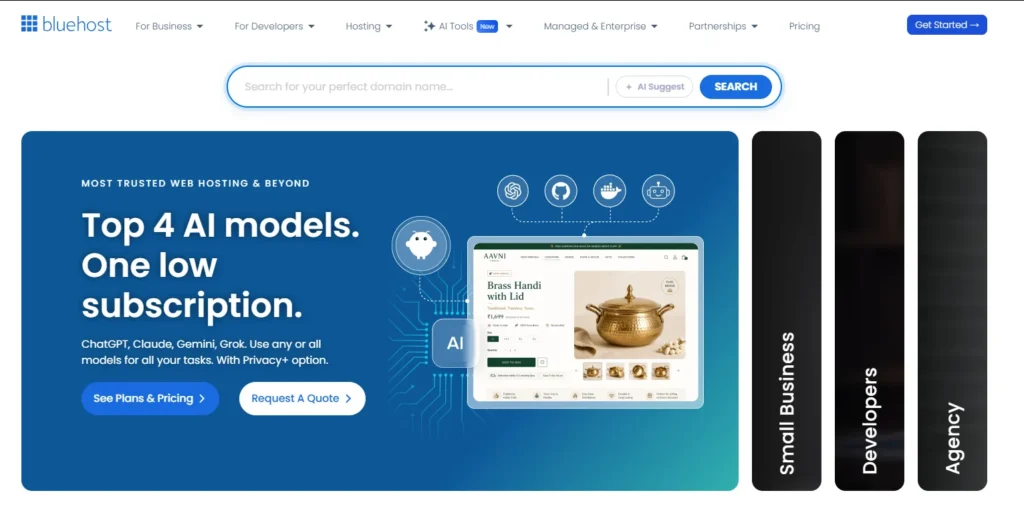
Bluehost is best known for shared hosting and WordPress hosting. It is often used by bloggers, affiliate marketers, portfolio owners, local businesses, service websites, and small online stores. The platform is designed for people who want to get online quickly without hiring a developer.
The biggest advantage of Bluehost is its simple setup. You can buy hosting, register a domain, install WordPress, activate SSL, and start building your website from one dashboard. For beginners, this saves a lot of time.
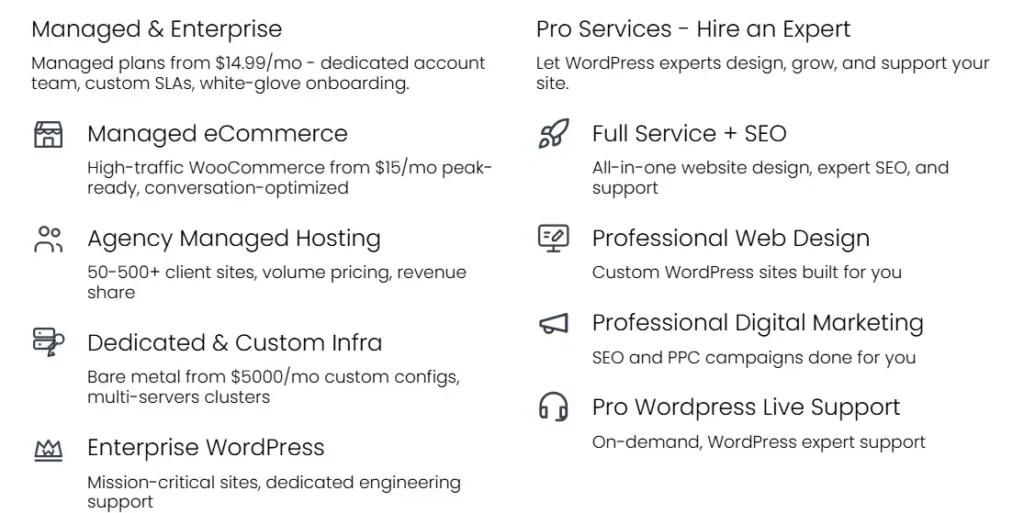
Bluehost also offers different hosting types, including shared hosting, WordPress hosting, WooCommerce hosting, VPS hosting, dedicated hosting, and managed solutions. This means you can start small and upgrade later if your traffic grows.
What Is Bluehost?
Bluehost is a web hosting company that helps users create, host, and manage websites. It offers hosting, domain registration, WordPress tools, email options, security tools, site migration, and ecommerce hosting.
The company is especially popular in the WordPress space. Many beginners choose Bluehost because it makes WordPress setup easy. Instead of manually installing WordPress, creating a database, setting DNS, and configuring SSL, Bluehost handles much of the process through a guided setup.
This is useful for people who want to publish a blog, business website, review site, landing page, agency website, or WooCommerce store without learning server management.
Bluehost Pricing
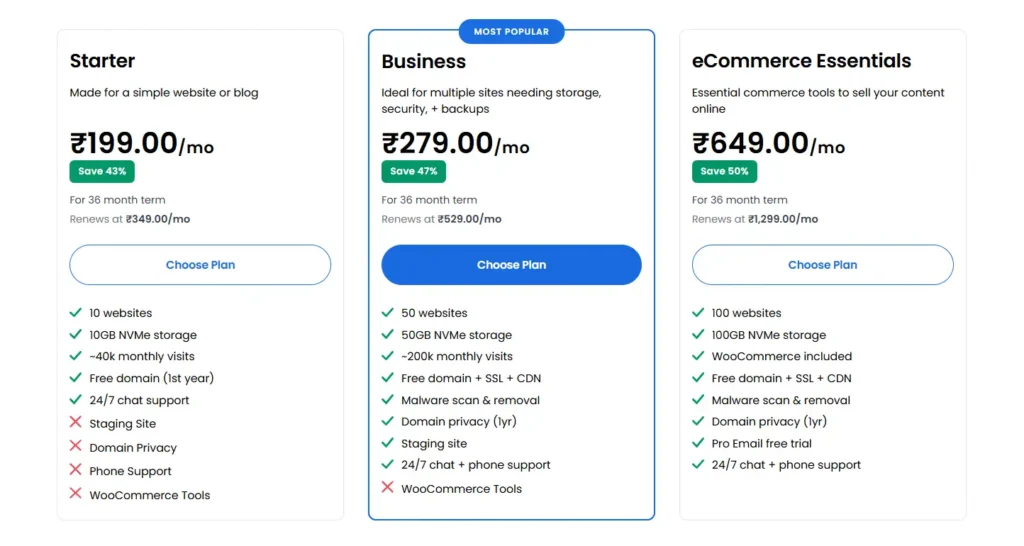
Bluehost pricing depends on the hosting type, plan, and billing term. Like most hosting companies, Bluehost offers lower promotional pricing for the first term and higher renewal pricing after that.
The main shared hosting plans currently include Starter, Business, and eCommerce Essentials.
Bluehost Shared Hosting Pricing Table
These prices are based on the 36 month term. If you choose a shorter billing cycle, the monthly cost may be higher. Taxes such as VAT or GST may also apply depending on your country.
Bluehost Renewal Pricing
Renewal pricing is one of the most important things to check before buying Bluehost. The first term looks affordable, but the renewal cost is higher. This is normal in the hosting industry, but beginners often miss it.
If you are buying Bluehost, the 36 month term gives the lowest monthly rate. However, you should calculate the total cost before checkout because you pay the term upfront.
Bluehost Features
1. Free Domain for the First Year
Bluehost includes a free domain for one year with eligible hosting plans on 12 or 36 month terms. This is useful for new websites because you can buy hosting and register your domain in one place.
The free domain is usually available for common extensions such as .com, .net, .org, .co, .site, .store, and similar eligible domain extensions. Premium domains are not included.
2. Free SSL Certificate
Every serious website needs SSL. It adds HTTPS to your website and helps protect visitor data. Bluehost includes free SSL, which is important for trust, SEO, and secure browsing.
Without SSL, browsers may show a warning to visitors. That can hurt conversions, especially if you are running a business website, affiliate site, or online store.
3. WordPress Friendly Setup
Bluehost is one of the easiest hosts for WordPress users. WordPress can be installed quickly, and the dashboard is built to guide beginners through setup.
You can choose a theme, create pages, connect your domain, activate SSL, and start editing without touching code. This makes Bluehost a good pick for users who want a simple launch process.
4. NVMe Storage
Bluehost now lists NVMe storage on its current plans. NVMe storage is faster than older traditional storage types and can help improve website responsiveness.
Storage is still limited by plan. Starter gives 10 GB, Business gives 50 GB, and eCommerce Essentials gives 100 GB. For normal blogs, small business sites, and affiliate websites, these limits are usually enough.
5. Free CDN
Bluehost includes a free CDN on its hosting plans. A CDN helps serve website files from locations closer to visitors. This can improve loading speed, especially when your audience comes from different countries or regions.
For SEO websites, faster loading can improve user experience, reduce bounce rate, and support better engagement.
6. Website Builder Tools
Bluehost includes website building tools that help users create a site faster. This is useful for beginners who do not want to design every page from scratch.
You can still use WordPress themes, page builders, plugins, and custom layouts. Bluehost does not lock you into a closed website builder the way some platforms do.
7. Managed WordPress Updates
WordPress updates are important for security and performance. Bluehost includes managed WordPress updates on WordPress hosting plans, which helps reduce maintenance work.
You still need to manage your plugins, themes, backups, and website quality, but automatic core updates make the process easier.
8. Security Features
Bluehost includes important security features such as free SSL, malware scanning on many plans, web application firewall features, DDoS protection, and backups depending on the plan.
Security is not something to ignore. If you are running an affiliate site, ecommerce store, or lead generation website, downtime or malware can cost money. Bluehost gives beginners a decent security base, though advanced websites may still need extra security plugins or premium tools.
9. Website Backups
Backups are included on many Bluehost plans, but the backup level can depend on the plan. Some plans include weekly backups, while higher tiers may include better backup features.
This matters because a bad plugin update, coding mistake, or malware issue can break a website. Backups make recovery easier.
10. 24/7 Support
Bluehost offers 24/7 support through chat. Phone support is included on selected plans. For beginners, this is a major benefit because hosting issues can feel confusing.
Support quality can vary by issue, but having access to help at any time is better than waiting days for email replies.
Bluehost Performance
Bluehost is strong enough for most beginner and small business websites. If you run a blog, portfolio, review site, service page, or small WooCommerce store, Bluehost should be able to handle regular traffic.
The use of NVMe storage, CDN, caching tools, and WordPress optimization gives Bluehost a better performance foundation than older shared hosting setups.
That said, shared hosting still has limits. If your site receives heavy traffic, has many plugins, uses large images, or runs complex WooCommerce features, you may eventually need VPS hosting, cloud hosting, or managed WordPress hosting.
For SEO, performance matters. A slow website can reduce conversions and make users leave faster. Bluehost gives you the tools, but you should still optimize images, use a lightweight theme, limit unnecessary plugins, and enable caching.
Bluehost Security
Bluehost gives a solid security setup for beginners. Free SSL is included, and many plans come with malware scanning, firewall protection, DDoS protection, and backups.
For a simple website, this is enough to get started. For a serious business website, you should still add extra protection. Use strong passwords, keep plugins updated, remove unused themes, enable two factor login if available, and run regular backups.
Security is not only the host’s job. A poorly maintained WordPress website can still get hacked even on good hosting. Bluehost helps, but you still need good website habits.
Bluehost Ease of Use
Ease of use is one of Bluehost’s strongest points. The dashboard is clean compared to older cPanel only hosting experiences. You can manage domains, websites, email, SSL, WordPress, and billing from one place.
For a new user, this is helpful. You do not need to understand every technical term before starting.
Bluehost is also good for users who want WordPress but feel that WordPress is too technical. The guided setup makes the first steps easier.
Bluehost Customer Support
Bluehost offers 24/7 chat support, and phone support is available on selected plans. This is useful when your site is down, SSL is not working, WordPress has an issue, or you need help connecting your domain.
Support is generally helpful for common hosting issues, beginner questions, setup problems, and account related tasks. For very advanced development issues, you may still need a developer.
This is normal with most shared hosting companies. Hosting support can help with server and account issues, but they may not fix custom code, plugin conflicts, or advanced theme problems.
Bluehost Pros and Cons
Pros
- Free domain for the first year on eligible plans
- Free SSL included
- Beginner friendly WordPress setup
- Good hosting dashboard for new users
- NVMe storage on current plans
- Free CDN included
- 24/7 chat support
- Good option for blogs and small business websites
- WooCommerce hosting options available
- 30 day money back guarantee for hosting
Cons
- Renewal prices are higher than intro prices
- Some add ons can increase checkout cost
Bluehost vs Similar Hosting Providers
Which Bluehost Plan Should You Choose?
The Starter plan is enough if you are building one basic site, personal blog, portfolio, or test project. It is the cheapest way to start with Bluehost.
The Business plan is the best choice for most users. It gives more storage, supports more websites, includes better support options, and works better for small businesses, content sites, and affiliate websites.
The eCommerce Essentials plan is the better pick if you want to sell products, use WooCommerce, accept payments, offer memberships, sell courses, or run an online store.
If your website already has high traffic or needs more server power, shared hosting may not be enough. In that case, VPS or managed hosting would make more sense.
Who Should Use Bluehost?
Bluehost is a good choice for beginners who want to launch a WordPress website quickly. It is also good for bloggers, local business owners, service providers, affiliate marketers, coaches, freelancers, and small ecommerce stores.
It works well if you want everything in one place, including domain, hosting, SSL, WordPress, email options, and support.
Bluehost is also a smart option if you do not want to manage servers yourself. You can focus on writing content, building pages, getting leads, or selling products instead of handling technical hosting setup.
Who Should Avoid Bluehost?
Bluehost may not be the best choice if you want the absolute cheapest hosting after renewal. It may also not be ideal for advanced developers who need custom server level control on a low budget.
If you run a large ecommerce store, high traffic news site, SaaS project, or heavy membership platform, shared hosting will likely be too limited. You should look at VPS, cloud hosting, dedicated hosting, or specialized managed hosting.
Also, if you hate renewal price increases, you should compare long term costs before buying.
Bluehost for WordPress
Bluehost is one of the most beginner friendly WordPress hosting options. It includes WordPress installation, managed updates, free SSL, CDN, builder tools, and support.
For a new WordPress user, this makes a big difference. You can avoid many setup problems and start creating pages faster.
Bluehost also works with popular WordPress themes and plugins. You can use Elementor, WooCommerce, Rank Math, Yoast SEO, WPForms, LiteSpeed alternatives, backup plugins, security plugins, and most normal WordPress tools.
Bluehost for Ecommerce
Bluehost’s eCommerce Essentials plan is built for online stores. It includes WooCommerce tools, payment features, product selling tools, and security features needed for online transactions.
It is a good option for small stores, digital product sellers, course creators, service sellers, and creators selling memberships.
However, if your store has hundreds of products, heavy traffic, advanced checkout logic, or large media files, you may need a stronger plan over time.
Bluehost for SEO Websites
Bluehost can work well for SEO websites if you set things up properly. You get SSL, CDN, WordPress tools, and enough resources for a growing content site.
For SEO, hosting is only one part of the setup. You also need fast themes, compressed images, clean internal linking, helpful content, good schema, and proper caching.
A Bluehost site can rank well, but only if the website itself is optimized. Hosting will not fix poor content, slow page builders, large images, or bad site structure.
Is Bluehost Worth It?
Bluehost is worth it for beginners, WordPress users, small businesses, bloggers, and anyone who wants simple hosting with enough tools to launch quickly.
The best value plan for most people is the Business plan because it gives more websites, more storage, higher estimated visits, and better support access than Starter.
The main thing to watch is renewal pricing. Bluehost is affordable at the first term price, but the cost goes up later. If you understand that before buying, Bluehost can still be a good choice.
Final Verdict
Bluehost remains a strong hosting provider for users who want a simple, WordPress friendly, beginner focused hosting experience. It gives you the main tools you need, including a free domain for the first year, free SSL, CDN, WordPress setup, NVMe storage, security features, backups, and 24/7 support.
It is not perfect. Renewal prices are higher, and some users may need stronger hosting as their traffic grows. But for new websites, blogs, business sites, and small online stores, Bluehost gives a balanced mix of price, features, and ease of use.
If you are starting your first WordPress website, Bluehost is a safe and practical choice. If you already have a large website, compare VPS, cloud, or managed hosting options before choosing a shared plan.