
Kinsta is not the cheapest WordPress hosting company in the market, and it does not try to be. It is built for website owners who care about speed, uptime, security, support quality, clean site management, and easy scaling.
If you are starting a small personal blog and only want the lowest monthly price, Kinsta may feel expensive. But if your website brings leads, sales, affiliate income, course sales, client bookings, or ecommerce revenue, hosting becomes more than just server space. It becomes part of your business setup.
That is where Kinsta makes sense.
Kinsta is a managed WordPress hosting provider that handles many technical tasks for you. This includes server optimization, caching, security protection, backups, staging, migrations, malware help, CDN setup, and support from WordPress trained engineers.
Instead of using a traditional shared hosting setup, Kinsta focuses on premium managed hosting for WordPress users who want better performance without managing the server themselves.
In this Kinsta review, we will look at pricing, features, plan limits, pros and cons, support, performance, security, and how Kinsta compares with similar hosting providers like WP Engine, SiteGround, Cloudways, Hostinger, Bluehost, and DreamHost.
What Is Kinsta?

Kinsta is a premium managed WordPress hosting platform. It is mainly known for hosting WordPress websites, WooCommerce stores, agency sites, high traffic blogs, SaaS blogs, education websites, affiliate websites, and business websites.
The main idea is simple. Kinsta gives you a managed environment where the hosting infrastructure, security setup, backups, CDN, caching, and server level performance are already handled.
You do not need to install a separate caching plugin for basic speed setup. You do not need to manually configure CDN rules for a normal WordPress site. You do not need to worry about server updates like you would on a raw VPS.
Kinsta also gives users a custom dashboard called MyKinsta. This dashboard is one of the cleaner parts of the platform. You can manage websites, domains, backups, staging, redirects, tools, users, analytics, cache, and migrations from one place.
The biggest selling point of Kinsta is that it is made for serious WordPress usage. It is not a general cheap hosting product with WordPress added as a feature. WordPress is the main focus.
Who Should Use Kinsta?
Kinsta is a good fit for:
- Bloggers making money from SEO traffic
- Affiliate marketers with revenue generating websites
- WooCommerce stores that need better performance
- Agencies managing client websites
- Businesses that cannot afford slow loading pages
- Publishers with growing traffic
- Course creators and membership websites
- Developers who want staging and site tools
- Companies that want premium support without managing a VPS
Kinsta may not be the best fit for:
Beginners who only want the cheapest hosting
Small hobby blogs with no traffic
Users who need email hosting included
People who want cPanel hosting
Users who prefer phone support over chat support
Sites that need unlimited storage at a low price
Kinsta is best when the website has real value. If your site makes money, collects leads, or represents a serious brand, the higher price becomes easier to justify.
Kinsta Pricing Overview
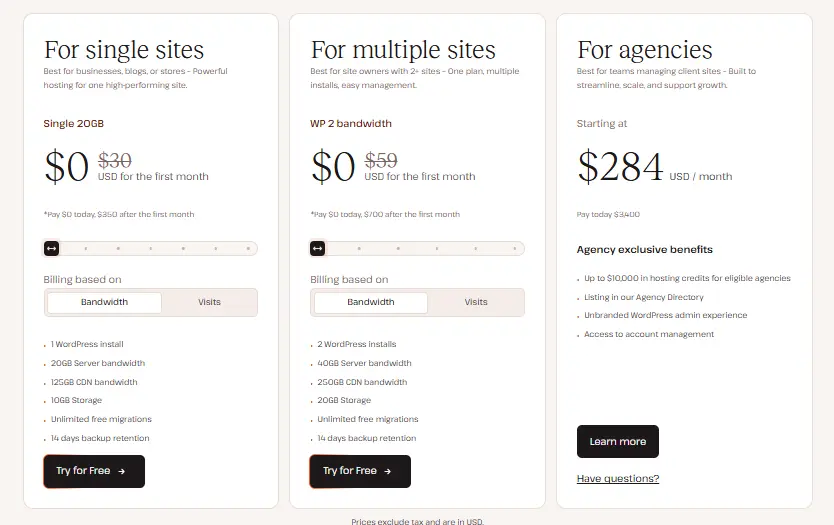
Kinsta pricing is different from many shared hosting providers. Instead of offering very cheap introductory plans, Kinsta prices its hosting as a premium managed WordPress service.
Kinsta offers single site plans, multiple site plans, agency plans, and custom enterprise plans. It also gives users two usage models on many plans: billing based on visits or billing based on server bandwidth.
This is important because different websites consume resources in different ways. A content website may care more about visit limits, while a site with heavier files or dynamic usage may prefer looking at bandwidth limits.
Prices are in USD and exclude taxes.
Kinsta Single Site Pricing Table
| Plan | Monthly Price | Annual Price Equivalent | WordPress Installs | Visits Or Bandwidth | Storage | CDN Bandwidth |
|---|---|---|---|---|---|---|
| Single 20GB or Single 35k | $35 per month | $30 per month | 1 | 20GB bandwidth or 35,000 visits | 10GB | 125GB |
| Single 40GB or Single 65k | $50 per month | $42 per month | 1 | 40GB bandwidth or 65,000 visits | 10GB | 250GB |
| Single 65GB or Single 125k | $90 per month | $75 per month | 1 | 65GB bandwidth or 125,000 visits | 10GB | 500GB |
| Single 125GB or Single 315k | $170 per month | $142 per month | 1 | 125GB bandwidth or 315,000 visits | 10GB | 750GB |
| Single 250GB or Single 500k | $290 per month | $242 per month | 1 | 250GB bandwidth or 500,000 visits | 15GB | 1,000GB |
| Single 500GB or Single 750k | $375 per month | $313 per month | 1 | 500GB bandwidth or 750,000 visits | 15GB | 1,500GB |
The entry plan starts at $35 per month on monthly billing. If you pay annually, the effective monthly cost starts at $30 per month, with the annual amount billed upfront.
For one WordPress website, this is more expensive than shared hosting. But it includes managed WordPress performance tools, free migrations, backups, CDN, staging, malware help, security features, and expert support.
Kinsta Multiple Site Pricing Table
| Plan | Monthly Price | Annual Price Equivalent | WordPress Installs | Visits Or Bandwidth | Storage | CDN Bandwidth |
| WP 2 | $70 per month | $59 per month | 2 | 40GB bandwidth or 70,000 visits | 20GB | 250GB |
| WP 5 | $115 per month | $96 per month | 5 | 65GB bandwidth or 125,000 visits | 30GB | 500GB |
| WP 10 | $225 per month | $188 per month | 10 | 125GB bandwidth or 315,000 visits | 40GB | 750GB |
| WP 20 | $340 per month | $284 per month | 20 | 250GB bandwidth or 500,000 visits | 50GB | 1,000GB |
| WP 40 | $450 per month | $375 per month | 40 | 500GB bandwidth or 750,000 visits | 60GB | 1,500GB |
The multiple site plans are better for website owners who manage more than one WordPress project. For example, an affiliate publisher with five niche sites may find the WP 5 plan cleaner than buying separate single site plans.
The biggest advantage here is account management. You can manage multiple sites from one dashboard, give access to team members, use staging, handle backups, and keep the technical setup organized.
Kinsta Agency Pricing Table
| Plan | Monthly Price | Annual Price Equivalent | WordPress Installs | Visits Or Bandwidth | Storage | CDN Bandwidth |
| Agency 20 | $340 per month | $284 per month | 20 | 250GB bandwidth or 500,000 visits | 50GB | 1,000GB |
| Agency 40 | $450 per month | $375 per month | 40 | 500GB bandwidth or 750,000 visits | 100GB | 1,500GB |
| Agency 60 | $675 per month | $563 per month | 60 | 750GB bandwidth or 1,250,000 visits | 150GB | 2,500GB |
Agency plans are built for teams that manage client websites. These plans include agency focused benefits such as account management, easy site transfer, client site workflows, and 30 day backup retention.
For a freelancer with one or two sites, agency plans are too much. For an agency hosting 20 or more client sites, the pricing can make sense because it reduces the need to manage separate accounts and hosting providers.
Kinsta Enterprise Pricing
Kinsta also offers custom enterprise plans starting at $500 per month.
Enterprise plans are for companies that need custom resources, dedicated virtual machines, higher traffic support, custom storage, custom CDN usage, and direct sales assistance.
This is not for a small blog or startup site. It is for larger businesses, media brands, enterprise WordPress projects, and websites with serious traffic or technical requirements.
Detailed Kinsta Features
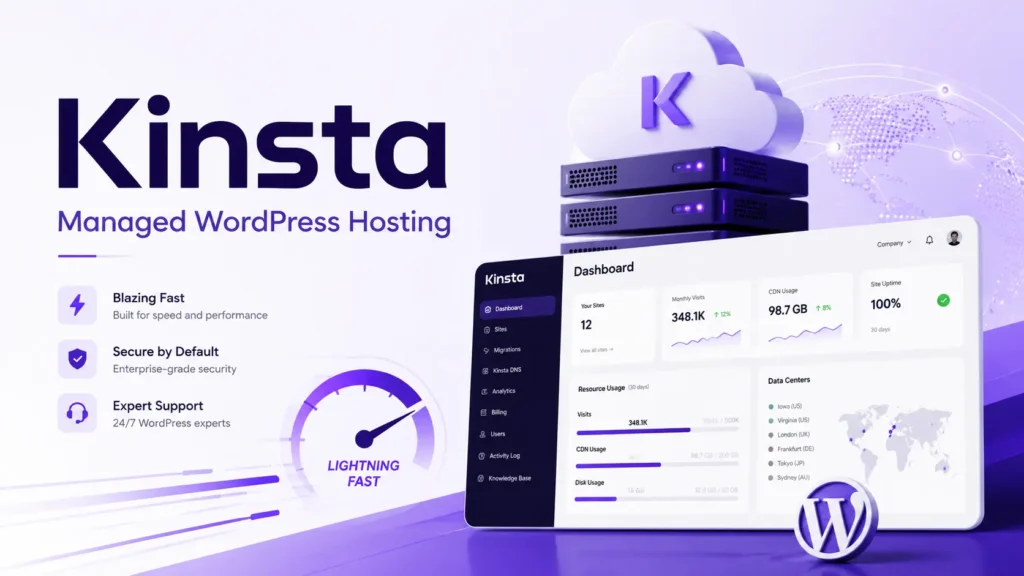
1. Managed WordPress Hosting
Kinsta is built around managed WordPress hosting. This means the platform handles many hosting tasks that users normally manage themselves.
You get server level optimization, WordPress focused performance setup, backups, staging, security monitoring, CDN integration, and technical support. This is useful for users who want a faster site but do not want to manage server commands, caching layers, or VPS settings.
2. MyKinsta Dashboard
MyKinsta is Kinsta’s custom hosting dashboard. It replaces the traditional cPanel style experience.
From MyKinsta, you can manage your websites, domains, backups, staging, SSL, redirects, cache, users, analytics, and migrations. The dashboard feels cleaner than old hosting panels and is easier for site owners who only care about WordPress management.
This is one of the reasons many agencies like Kinsta. It saves time when managing several websites.
3. Free Unlimited Migrations
Kinsta includes free WordPress site migrations on all plans. Their migration team can move your existing WordPress website to Kinsta.
This is useful if you are moving from Bluehost, SiteGround, Hostinger, GoDaddy, WP Engine, Cloudways, or another host. Migration is often the most stressful part of changing hosting providers, so having it handled by the hosting team is a strong benefit.
4. CDN And Edge Caching
Kinsta includes CDN and edge caching. This helps your website serve cached content from locations closer to your visitors.
For SEO, this matters because speed affects user experience, crawl efficiency, conversions, and Core Web Vitals. A faster site does not guarantee rankings, but slow hosting can hurt user behavior and conversions.
For global websites, CDN support is especially useful. If your visitors come from the United States, India, Europe, Australia, or multiple regions, CDN delivery can reduce loading delays.
5. Built In Application Performance Monitoring
Kinsta includes its own APM tool. APM means application performance monitoring.
This helps you find performance bottlenecks in your WordPress site. For example, a slow plugin, heavy database query, theme issue, or WooCommerce function may slow down pages. Instead of guessing, APM gives you better visibility.
This is helpful for ecommerce stores, membership sites, course platforms, and high traffic blogs.
6. Automatic Backups
Kinsta includes backup retention depending on the plan type. Business plans include 14 day backup retention, while agency plans include 30 day backup retention.
Backups matter because WordPress websites can break during plugin updates, theme changes, code edits, or malware issues. A clean restore point can save hours of work.
Kinsta also offers add ons for users who need more frequent backups.
7. One Click Staging
Kinsta includes staging environments. This lets you test changes before pushing them live.
If you run a serious website, staging is important. You can test plugin updates, theme changes, page builder edits, custom code, and WooCommerce changes without breaking the live site.
This is especially useful for agencies, developers, ecommerce stores, and large content sites.
8. Security Features
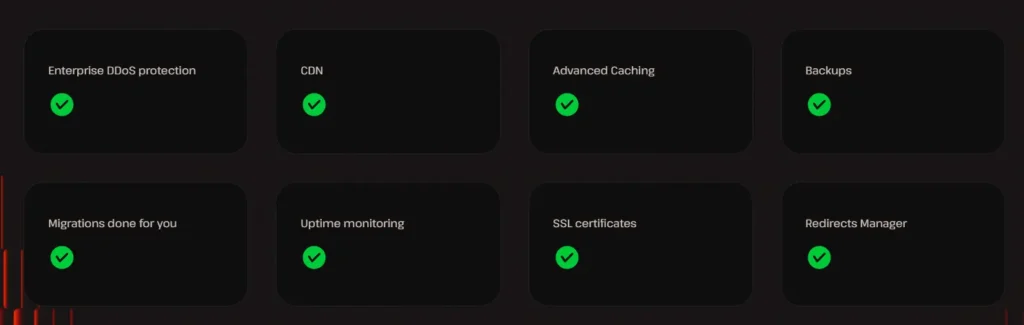
Kinsta includes free SSL certificates with wildcard support, a managed web application firewall, DDoS protection, suspicious activity monitoring, and free malware removal.
This does not mean your website can ignore basic security practices. You still need strong passwords, updated plugins, safe themes, and careful admin access. But Kinsta gives you a stronger security base than many low cost shared hosts.
9. Free Malware Removal
Free malware removal is a big plus. Many hosting providers charge extra for malware cleanup or push users toward paid security tools.
With Kinsta, if your site gets infected while hosted on their platform, their team helps remove malware at no extra charge. For business sites, this can be valuable because malware cleanup can be expensive and stressful.
10. Expert Support
Kinsta offers 24/7 support through chat. Their support is handled by WordPress trained engineers, not basic front line agents reading scripts.
This is one of the main reasons people pay more for managed hosting. When a site goes down, shows a server error, has caching issues, or runs into plugin conflicts, good support can save time and money.
Kinsta does not focus on phone support. If phone support is important to you, this may be a drawback.
Kinsta Performance Review
Kinsta is made for performance focused WordPress hosting. It includes caching, CDN, optimized infrastructure, database optimization, and server level tools.
The biggest performance benefit is that users do not need to build everything from scratch. On unmanaged hosting, you may need to configure caching, CDN, image delivery, database cleanup, security settings, and server resources yourself. Kinsta gives you a more prepared setup.
For a normal blog, the speed improvement may be noticeable when moving from cheap shared hosting. For WooCommerce, membership sites, and heavy WordPress builds, the benefit can be bigger because these sites rely more on PHP and database performance.
Still, hosting is only one part of speed. Your theme, plugins, page builder, image size, ad scripts, tracking scripts, and database health also matter. Kinsta can give you a strong base, but it cannot fix every badly built website automatically.
Kinsta Pros And Cons
Pros
- Premium managed WordPress hosting
- Clean MyKinsta dashboard
- Free unlimited WordPress migrations
- CDN and edge caching included
- Built in APM tool
- Free SSL certificates
- Managed WAF and DDoS protection
- Free malware removal
- Staging environment included
- Strong fit for agencies and serious websites
- Good support for ecommerce and membership sites
- Annual billing discount available
Cons
- More expensive than shared hosting
- No email hosting included
- No traditional cPanel
- Phone support is not the main support option
- Storage limits may feel low on cheaper plans
- Not ideal for hobby websites
- Add ons can increase the total cost
- Visit and bandwidth limits need to be checked carefully
Kinsta Compared With Similar Hosting Providers
| Hosting Provider | Starting Price | Best For | Main Strength | Main Limitation |
| Kinsta | $35 per month | Premium WordPress hosting | Speed, support, security, managed tools | Higher price |
| WP Engine | From around $30 per month | Managed WordPress users | Strong WordPress ecosystem | Can become costly as usage grows |
| SiteGround | Promo from $2.99 per month | Small business sites | Affordable entry pricing | Renewal pricing is much higher |
| Cloudways | From $11 per month | Users who want managed cloud control | Flexible cloud server choice | More technical than Kinsta |
| Hostinger | From ₹69 per month in India | Beginners and budget sites | Very low starting price | Not the same premium managed level |
| Bluehost | From $3.99 per month | New WordPress users | Beginner friendly setup | Shared plans are less premium |
| DreamHost | From $2.89 per month for web hosting | Bloggers and small sites | Affordable plans and WordPress options | Managed WordPress costs more |
Kinsta sits closer to WP Engine than Bluehost or Hostinger. It is not trying to compete with budget shared hosting. It is a premium WordPress host for users who care more about speed, security, and support than the lowest monthly bill.
SiteGround is a good middle ground for small businesses. Cloudways is good for users who want more server control. WP Engine is a direct premium competitor. Hostinger and Bluehost are better for beginners who need cheap hosting first.
Is Kinsta Good For SEO?
Yes, Kinsta can be good for SEO from a technical hosting point of view.
Fast hosting helps pages load quickly. CDN and caching help global visitors. Better uptime helps search engines access your site. Strong security reduces malware risk. Staging helps you test changes safely. Backups protect your content.
But Kinsta will not rank your website by itself. You still need quality content, internal links, backlinks, keyword research, good UX, optimized images, clean theme code, and a proper SEO strategy.
Think of Kinsta as a strong technical base. It can support SEO growth, but it does not replace SEO work.
Is Kinsta Good For WooCommerce?
Kinsta can be a strong option for WooCommerce stores because ecommerce websites are usually heavier than simple blogs.
WooCommerce uses dynamic pages, cart sessions, checkout flows, customer accounts, product pages, search, filters, and database activity. Cheap hosting can struggle when stores grow.
Kinsta’s managed setup, APM tool, staging, backups, CDN, security, and support make it a better fit for WooCommerce than basic shared hosting.
The main thing to check is the plan limit. A WooCommerce store may need more resources than a normal blog, so choosing the cheapest plan may not always be enough.
Is Kinsta Good For Agencies?
Yes, Kinsta is one of the better hosting choices for agencies that manage WordPress websites.
The agency plans support multiple installs, larger storage, higher CDN limits, 30 day backup retention, account managers, site transfer, user access controls, staging, and MyKinsta tools.
For agencies, the value is not only hosting performance. It is also workflow. If your team manages many websites, a clean dashboard and reliable support can save time every week.
Kinsta Add Ons And Extra Costs
Kinsta includes many features, but some items can cost extra.
Examples include premium staging environments, extra disk space, additional WordPress sites, hourly backups, external backups, Redis caching, PHP performance add ons, and reverse proxy setup.
This is not unusual for premium hosting, but users should understand the real cost before signing up. If you need extra storage, more sites, advanced caching, or frequent backups, the monthly price can increase.
Kinsta Ease Of Use
Kinsta is easy to use for most WordPress site owners. The dashboard is modern and cleaner than traditional hosting panels.
Beginners may need some time to understand terms like CDN, edge caching, staging, APM, bandwidth, and visits. But day to day website management is simple.
For developers and agencies, Kinsta is even easier because it removes server management tasks while still giving useful tools.
Kinsta Support Review
Kinsta support is one of its main strengths. Users get chat support from WordPress focused engineers. This is better than basic hosting support where the agent may only handle simple account questions.
The lack of phone support may bother some users, but Kinsta’s chat based support is designed for faster technical troubleshooting. In many hosting cases, chat is also better because links, logs, screenshots, and technical instructions are easier to share.
Final Verdict: Is Kinsta Worth It?
Kinsta is worth it if your WordPress website matters to your business.
It is a good choice for serious bloggers, affiliate site owners, WooCommerce stores, agencies, course websites, membership platforms, and business websites that need fast performance, strong security, reliable backups, expert support, and simple site management.
It is not the best choice if you only want the cheapest hosting. For a small personal blog with no revenue, Hostinger, Bluehost, DreamHost, or SiteGround may be more budget friendly.
But for a money making WordPress site, Kinsta gives you a stronger foundation. The pricing is higher, but you get managed WordPress tools, premium support, free migrations, security features, CDN, staging, backups, APM, and a clean dashboard.
Overall, Kinsta is a premium WordPress hosting provider for users who want performance and reliability without managing hosting infrastructure themselves.