
Choosing between SiteGround vs Hostinger is annoying because both look good on paper. Both promise fast WordPress hosting. Both include free SSL. Both offer beginner friendly tools. Both run big discount deals that make the first bill look tiny.
But once you check renewals, backups, speed tools, support quality, and actual dashboard experience, the difference becomes clear.
If I had to pick one for a new blog with a tight budget, I would pick Hostinger. If I were hosting a serious business site where support and stability matter more than saving money, I would lean SiteGround.
SiteGround vs Hostinger Quick Comparison Table
| Feature | SiteGround | Hostinger |
|---|---|---|
| Starting Price | From $2.99/mo | From $2.99/mo |
| Renewal Price | Higher renewals | Lower renewals than SiteGround |
| Best Plan for Most Users | GrowBig | Business |
| Uptime Claim | Strong uptime history, stable platform | 99.9% uptime guarantee |
| Server Technology | Google Cloud, custom caching, SiteGround CDN | LiteSpeed, NVMe storage, CDN, Object Cache |
| Control Panel | SiteGround Site Tools | Hostinger hPanel |
| Free Domain | Available on current deals | Free on Premium and above for yearly terms |
| Backups | Daily backups on all plans | Weekly on lower plans, daily on Business and above |
| Support | Stronger technical support | Good support, but less technical depth |
| Best For | Business sites, agencies, WooCommerce, users who need better support | Beginners, bloggers, affiliate sites, budget users |
SiteGround vs Hostinger: Quick Pricing Reality
Both companies use the same trick.
They show a low first term price. Then the renewal price jumps.
SiteGround’s jump is sharper.
Hostinger also increases after the first term, but the renewal price is still easier to accept for small sites.
For example:
| Plan Type | SiteGround | Hostinger |
|---|---|---|
| Entry Plan | StartUp from $2.99/mo | Premium from $2.99/mo |
| Mid Plan | GrowBig from $4.99/mo | Business from $3.99/mo |
| Higher Plan | GoGeek from $7.99/mo | Cloud Startup from $7.99/mo |
| Renewal Pain | High | Medium |
Key takeaway: Hostinger gives you more room to grow before the bill starts hurting.
SiteGround Deep Dive

SiteGround has built a strong name in WordPress hosting because it feels more premium than typical cheap shared hosting.
I have used SiteGround on WordPress sites where downtime was not acceptable. It feels stable. The dashboard is clean. The support team usually understands WordPress issues better than low cost hosts.
SiteGround is not the cheapest host. That is not its game.
Its real value is managed WordPress hosting with better support, built in caching, daily backups, staging on higher plans, and a dashboard that keeps most things simple.
Key SiteGround Features

SiteGround gives you:
- Free SSL
- Free CDN
- Daily backups
- Free email
- Managed WordPress updates
- WordPress migration tool
- WP CLI and SSH
- Staging on GrowBig and GoGeek
- Git on GoGeek
- Custom Site Tools dashboard
- Strong security tools
- Built in caching
- Google Cloud based infrastructure
The best SiteGround plan for most users is GrowBig.
StartUp is fine for one small website, but the limits feel tight if your blog grows. GrowBig gives you unlimited websites, more storage, staging, on demand backups, and better resources.
GoGeek is for agencies, developers, and bigger WordPress sites that need priority support and Git.
Why SiteGround Is Popular
SiteGround is popular because it handles the boring hosting stuff well.
You do not need to install ten plugins just to make WordPress usable. You get caching, backups, SSL, security, and staging from the host itself.
The support is also a big reason people stay. You can usually get better answers from SiteGround than from many budget hosts. If your site breaks after a plugin update, that matters.
SiteGround Pros
- Strong WordPress performance
- Better support than most budget hosts
- Daily backups included
- Free SSL, CDN, and email
- Clean Site Tools dashboard
- Staging on GrowBig and GoGeek
- Good for WooCommerce and business sites
- Developer tools like SSH, WP CLI, Git on higher plans
SiteGround Cons
- Renewal prices are high
- StartUp plan is limited
- No traditional cPanel
- Best features are locked behind GrowBig and GoGeek
- Not the cheapest option for beginners
- Resource limits can still matter on high traffic sites
Who Should Buy SiteGround?
Buy SiteGround if you want better managed hosting and you are okay paying more after renewal.
It makes sense for:
- Business websites
- WooCommerce stores
- Agencies
- Freelancers managing client sites
- WordPress users who want staging
- Website owners who need better support
- Users who do not want to deal with server level headaches
If your site makes money, SiteGround is easier to justify.
Hostinger Deep Dive
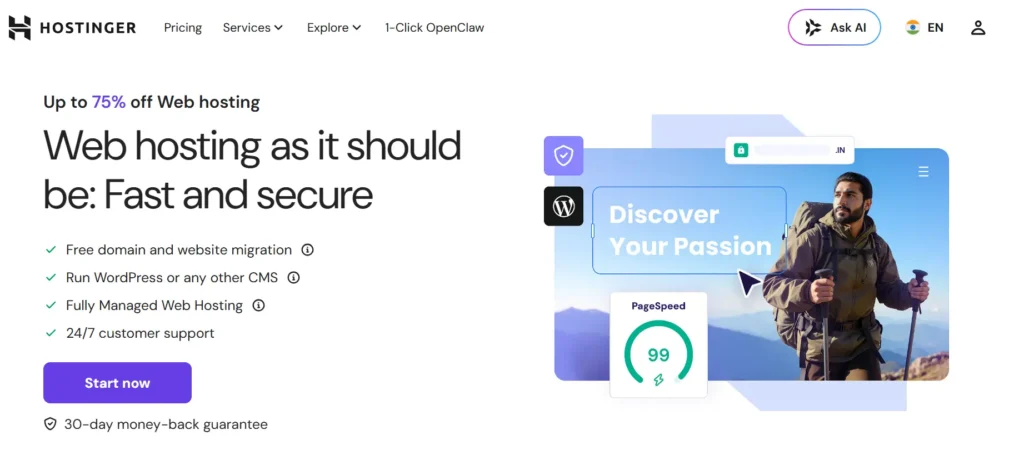
Hostinger is the better value pick in this comparison.
It is cheap, but not in the old “slow shared hosting” way. Hostinger has improved a lot over the years. Its hPanel is clean. Its WordPress setup is easy. LiteSpeed servers give it a real performance advantage for the price.
For bloggers, affiliate marketers, local business sites, and beginners, Hostinger is hard to ignore.
The main reason is simple. You pay less and still get solid speed.
Key Hostinger Features
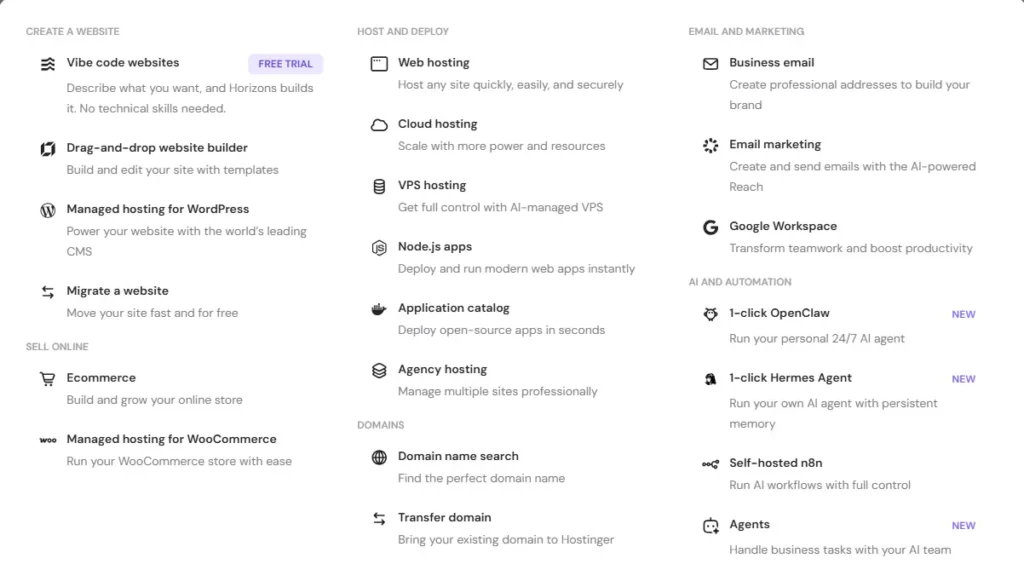
Hostinger gives you:
- Free SSL
- Free migration
- LiteSpeed web server
- NVMe storage on higher plans
- Custom hPanel dashboard
- Weekly backups on lower plans
- Daily backups on Business and above
- Free domain on Premium and above
- Free CDN on Business and above
- Malware scanner
- WordPress auto updates
- Object Cache
- AI website tools
- Email included for the first year on many plans
The best Hostinger plan for most users is Business.
Premium is okay for small blogs, but Business is the better long term pick. You get daily backups, more storage, better performance tools, CDN, and support for more websites.
Cloud Startup is for people who want more power without managing a VPS.
Hostinger’s Unique Selling Point
Hostinger’s biggest strength is value.
You get LiteSpeed hosting, a beginner friendly dashboard, free migration, and WordPress tools at a lower renewal cost than SiteGround.
That makes it one of the best affordable hosting 2026 options for bloggers and small business sites.
It is not perfect. Support is not as deep as SiteGround. Some features are locked behind higher plans. The cheapest plan is too limited for serious use.
But for the price, Hostinger gives you a lot.
Hostinger Pros
- Better value for money
- LiteSpeed server technology
- Very easy hPanel dashboard
- Free migration
- Free SSL
- Free domain on Premium and above
- Lower renewal prices than SiteGround
- Good WordPress performance
- Business plan includes daily backups
- Great for beginners and affiliate blogs
Hostinger Cons
- Support is not as strong as SiteGround
- No phone support
- Cheapest plan has limited resources
- Daily backups are not on every plan
- Some AI features feel more like marketing than must have tools
- Advanced users may outgrow shared plans
Who Should Buy Hostinger?
Buy Hostinger if you want fast hosting without spending too much.
It makes sense for:
- New bloggers
- Affiliate sites
- Small business websites
- Portfolio sites
- Beginners
- Budget WordPress users
- People starting multiple niche sites
- Users who want a simple dashboard
If you are trying to keep hosting under control for the first few years, Hostinger is the smarter pick.
SiteGround vs Hostinger Performance Battle
Performance is where this comparison gets interesting.
SiteGround has a strong managed WordPress stack. Hostinger has LiteSpeed, which is excellent for WordPress when configured properly.
Both can be fast.
But they do it differently.
Speed and TTFB
If you run a basic WordPress site with a lightweight theme, optimized images, and caching enabled, Hostinger can load very fast for the price.
LiteSpeed works well with the LiteSpeed Cache plugin. That combination is one of the reasons Hostinger performs better than many cheap hosts.
SiteGround uses its own caching system and performance tools. It also has strong server level optimization and a polished WordPress setup.
In a real SiteGround vs Hostinger speed test, I would expect:
- Hostinger to win on raw value and speed per dollar
- SiteGround to feel more stable under managed WordPress workloads
- SiteGround GrowBig or GoGeek to handle business sites better than basic shared plans
- Hostinger Business to beat most entry level shared hosting plans
For a normal blog, Hostinger is fast enough.
For a serious business site, SiteGround feels more dependable.
Uptime
Both hosts are good enough for normal websites.
Hostinger promotes a 99.9% uptime guarantee. SiteGround also has a strong uptime reputation and a more premium infrastructure setup.
The bigger issue is not the advertised uptime number. It is how the host responds when something breaks.
That is where SiteGround has the edge.
Hostinger is reliable for the price. SiteGround is more reassuring if your site is tied to revenue.
Server Technology: LiteSpeed vs SiteGround Stack
Hostinger uses LiteSpeed web server technology. That is a big plus for WordPress.
LiteSpeed Cache can handle page caching, image optimization, CSS cleanup, database optimization, and more. For beginners, it can deliver great speed without too much manual setup.
SiteGround uses its own optimized setup with custom caching, CDN, and managed WordPress tools. It is less about one famous server brand and more about a complete managed stack.
My take: Hostinger wins on speed for the money. SiteGround wins on polished managed performance.
SiteGround vs Hostinger User Interface
Neither host uses classic cPanel for its main shared hosting experience now.
SiteGround uses Site Tools.
Hostinger uses hPanel.
SiteGround Site Tools
SiteGround Site Tools is clean and website focused. Each site gets its own tools area. That makes sense when you manage multiple WordPress sites.
You can handle:
- Domains
- SSL
- Backups
- Staging
- Caching
- File manager
- Databases
- Security
- WordPress tools
It feels more serious than Hostinger’s dashboard. Not harder, just more business focused.
Hostinger hPanel
Hostinger hPanel is one of the easiest hosting dashboards for beginners.
You can install WordPress, add SSL, set up email, manage domains, and request migration without feeling lost.
It is not cPanel, and that may annoy old school developers. But for beginners, hPanel is easier.
Winner for beginners: Hostinger
Winner for agencies and business users: SiteGround
SiteGround vs Hostinger Pricing and Renewal Hikes
This is where Hostinger pulls ahead.
SiteGround’s first term pricing looks attractive. But renewals are expensive.
Hostinger also has renewal hikes, but they are easier to live with.
The Pricing Trap
Do not judge hosting by the first month price.
That $2.99 price is usually promotional. The real cost shows up at renewal.
Before you buy, check:
- Renewal price
- Contract length
- Backup policy
- Domain renewal price
- Email renewal cost
- CDN limits
- Migration rules
SiteGround gives you a premium experience, but you pay for it later.
Hostinger gives you more budget breathing room.
Winner on pricing: Hostinger
Customer Support
SiteGround wins support.
That does not mean Hostinger support is bad. Hostinger support is fine for normal issues. It can help with SSL, WordPress install, migration, email setup, and common errors.
But SiteGround support feels more technical.
If you are troubleshooting a plugin conflict, database issue, staging problem, or WooCommerce error, SiteGround is usually better.
Hostinger is good for beginners. SiteGround is better for serious site owners.
Winner on support: SiteGround
Security and Backups
Both hosts include the basics.
You get free SSL with both. You get security monitoring. You get backups. You get malware protection features.
But the backup policy matters.
SiteGround includes daily backups across plans. That is a big plus.
Hostinger includes weekly backups on lower plans and daily backups on Business and above. So if you choose Hostinger, I would skip the cheapest plan and go with Business.
Security Comparison
| Feature | SiteGround | Hostinger |
|---|---|---|
| Free SSL | Yes | Yes |
| Daily Backups | Yes | Business and above |
| Malware Tools | Yes | Yes |
| CDN | Yes | Business and above for best value |
| WAF | Strong managed protection | Security tools included |
| WordPress Updates | Managed | Managed |
| Best Security Value | GrowBig | Business |
Winner on backups: SiteGround
Winner on security value: Tie, if you choose Hostinger Business
Migration Experience
Both hosts make migration easier than doing it manually.
SiteGround offers a WordPress migration tool and free transfer options on current offers. For most WordPress sites, it is smooth.
Hostinger offers free website migration and lets you request it from hPanel. This is one of its best beginner features.
If you are moving a simple WordPress blog, Hostinger is easier.
If you are moving a business site, WooCommerce store, or client project, SiteGround feels safer because support quality is better.
Winner for simple migration: Hostinger
Winner for complex migration: SiteGround
Which One Is Better for Beginners?
Hostinger is better for beginners.
The dashboard is simpler. The pricing is easier. WordPress setup is fast. The free migration process is clear. You do not need to understand hosting deeply to get started.
Hostinger also gives you a better starting point if you are testing a blog idea.
I would recommend Hostinger to beginners who want:
- A personal blog
- A niche affiliate site
- A small business website
- A portfolio
- A basic WordPress site
- A low cost first hosting plan
Just do not buy the cheapest plan blindly. Hostinger Business is the better long term option.
Which One Is Better for Business and E-commerce?
SiteGround is better for business and e-commerce.
WooCommerce sites need stability. They also need good backups, staging, security, and better support.
SiteGround GrowBig and GoGeek make more sense for stores, agencies, and service businesses. Staging alone is useful when you are updating plugins or testing checkout changes.
Hostinger can run small WooCommerce stores, especially on Business or Cloud Startup. But if orders matter every day, I would rather pay more for SiteGround.
Business winner: SiteGround
Budget business winner: Hostinger Business
Real World Scenario: If I Had a $50 Budget
If I were starting a niche blog today with a $50 budget, I would choose Hostinger.
Not because SiteGround is weak. SiteGround is good.
But with a small budget, Hostinger lets me stretch my money further. I can buy hosting, connect a domain, install WordPress, set up SSL, and start publishing without worrying too much about cost.
For a niche blog, I care about:
- Low first year cost
- Simple WordPress setup
- Good speed
- Free SSL
- Free migration
- Easy dashboard
- Affordable renewal
Hostinger checks those boxes better.
If the blog starts making money, I can upgrade later.
SiteGround vs Hostinger Final Verdict: Who Wins in 2026?
Hostinger is the overall winner in 2026 for most users.
It gives better value, lower renewal pricing, strong LiteSpeed performance, a simple dashboard, free migration, and enough features for blogs, affiliate sites, and small business websites.
SiteGround is still the better premium choice.
If you run a WooCommerce store, agency site, or business website where support quality matters, SiteGround is worth paying more for.
Here is the clean answer:
- Choose Hostinger if you want the best affordable hosting 2026 option.
- Choose SiteGround if you want better support, stronger managed WordPress tools, and more confidence for business hosting.
- Choose Hostinger Business if you want the best value plan.
- Choose SiteGround GrowBig if you want the best SiteGround plan for serious WordPress use.
For me, the winner of SiteGround vs Hostinger is Hostinger for value. SiteGround wins for support and business reliability.
We track the latest deals for both providers; check our coupon section before you buy.
FAQs
1. Does SiteGround offer a free domain?
Yes, SiteGround currently offers a free domain on selected hosting deals. Always check the checkout page because hosting offers can change.
2. Is Hostinger good for WordPress?
Yes. Hostinger is good for WordPress, especially on the Business plan. LiteSpeed, Object Cache, free SSL, backups, and hPanel make it easy for beginners.
3. Which is faster, SiteGround or Hostinger?
Hostinger can be faster for the price because of LiteSpeed. SiteGround offers a more polished managed WordPress stack. For a simple blog, Hostinger is fast enough. For business sites, SiteGround feels more stable.
4. Is SiteGround worth the higher renewal price?
Yes, if support, backups, staging, and business reliability matter to you. No, if you are starting a small blog and need the lowest long term cost.
5. Which plan should I choose from Hostinger?
Choose Hostinger Business. Premium is fine for basic sites, but Business gives better performance features, daily backups, CDN, and more room to grow.
6. Which plan should I choose from SiteGround?
Choose SiteGround GrowBig. StartUp is okay for one small site, but GrowBig gives better value with unlimited websites, staging, on demand backups, and stronger resources.
7. Which is better for affiliate websites?
Hostinger is better for most affiliate websites because it is cheaper, fast, easy to manage, and good enough for content heavy blogs. If the site already earns serious money, SiteGround is also a smart upgrade.