
Choosing between Kinsta vs Cloudways is annoying because both sound premium, both talk about speed, and both are much better than cheap shared hosting. But they are not built for the same buyer.
Kinsta is for people who want managed WordPress hosting that feels polished, stable, and hands-off. Cloudways is for people who want more server control, better pricing flexibility, and cloud hosting without managing raw VPS servers.
Quick Winner: For 2026, I would pick Kinsta for serious WordPress business sites and WooCommerce stores, but I would pick Cloudways if budget and flexibility matter more than hand-holding.
We track the latest deals for both providers; check our coupon section before you buy.
Kinsta vs Cloudways Quick Comparison Table
| Feature | Kinsta | Cloudways |
|---|---|---|
| Starting Price | Around $35/month monthly, lower on annual billing | Around $11/month depending on server |
| Hosting Type | Premium managed WordPress hosting | Managed cloud hosting |
| Best For | WordPress businesses, agencies, WooCommerce, high-value sites | Bloggers, developers, agencies, growing sites on a budget |
| Server Technology | Google Cloud, isolated containers, NGINX, PHP, MySQL, Cloudflare edge caching | DigitalOcean, AWS, Google Cloud and others, NGINX, Apache, Varnish, Redis, Memcached |
| Free Domain | No | No |
| Free SSL | Yes | Yes |
| Backups | Daily backups included | Automated backups, but offsite backup storage may cost extra |
| CDN | Included with Kinsta plans | Cloudflare add-on available |
| Support | 24/7 expert WordPress support | 24/7 support, premium support costs extra |
| Beginner Friendly | Very easy | Moderate |
| Developer Friendly | Strong, but more controlled | Very strong and more flexible |
Kinsta: Kinsta Deep Dive

Kinsta is not trying to be the cheapest host. That is clear from the first click.
It is a premium managed WordPress host. You pay more because Kinsta handles a lot of the boring technical work for you. Backups. Caching. CDN. Malware cleanup. Staging. Server monitoring. WordPress support.
That is the whole pitch.
What Makes Kinsta Popular?
Kinsta became popular because it removes a lot of hosting headaches. You do not get cPanel. You do not get a messy dashboard full of upsells. You get MyKinsta, which is one of the cleanest hosting dashboards I have used.
Inside MyKinsta, you can manage:
- WordPress installs
- Backups
- Staging sites
- CDN settings
- Redirects
- PHP versions
- Cache clearing
- Performance monitoring
- Domain setup
- User access
For beginners, that is a big win. For developers, it is also clean enough to work fast.
Kinsta also uses isolated container technology. That means your WordPress site is not just sitting inside one messy shared environment with hundreds of random websites. Each site has its own isolated software container.
That helps with stability.
Kinsta Pros
- Excellent WordPress performance
- Very clean dashboard
- Free migrations
- Daily backups included
- Cloudflare CDN and edge caching included
- Strong security
- Free malware removal
- Great support quality
- Good for agencies and serious businesses
Kinsta Cons
- Not cheap
- No email hosting
- No free domain
- Only makes sense if your site earns or supports business
- Plan limits can get expensive as traffic grows
- Less flexible than Cloudways for server-level control
Who Should Buy Kinsta?
Buy Kinsta if your website matters to your business.
That includes:
- WooCommerce stores
- Lead generation websites
- SaaS blogs
- Affiliate sites making consistent revenue
- Agency client websites
- Membership websites
- High-traffic WordPress blogs
If your site makes money, Kinsta’s price is easier to justify. If your site is still a hobby, it may feel expensive.
Cloudways: Cloudways Deep Dive
Cloudways is different.
It is not a traditional host. It is a managed cloud hosting platform. You choose a cloud provider, pick a server size, and Cloudways adds a managed layer on top.
That means you get the power of cloud hosting without dealing with command line server setup.
What Makes Cloudways Unique?
Cloudways gives you more freedom than Kinsta.
You can choose different server providers. You can scale your server. You can host multiple applications. You can use WordPress, WooCommerce, Laravel, PHP apps, and more.
That flexibility is the main reason developers like it.
Cloudways also uses a performance stack with NGINX, Apache, Varnish, Redis, Memcached, and PHP-FPM. It is not LiteSpeed hosting. Some people confuse this because many budget WordPress hosts use LiteSpeed now.
Cloudways is more of a custom cloud stack.
Cloudways Pros
- Lower starting price
- Pay-as-you-go billing
- Good performance for the money
- Multiple cloud server options
- Great for developers
- Staging included
- Free SSL
- Free migration
- Unlimited application installs
- Easy scaling
- More control than Kinsta
Cloudways Cons
- Not as beginner-friendly as Kinsta
- No domain registration
- No email hosting by default
- Offsite backups can add extra cost
- Cloudflare Enterprise is a paid add-on
- Support quality depends on issue complexity
- Premium support costs extra
- You still need to understand servers a little
Who Should Buy Cloudways?
Buy Cloudways if you want better hosting than shared hosting but do not want to pay Kinsta pricing yet.
It is a smart fit for:
- Niche bloggers
- Affiliate marketers
- Developers
- Small agencies
- Growing WordPress sites
- WooCommerce stores on a tighter budget
- People managing multiple sites
Cloudways gives you more control, but you need to be more involved.
Kinsta vs Cloudways Performance: Speed, TTFB, Uptime, and Server Tech
This is where the Kinsta vs Cloudways speed test conversation gets interesting.
Both can be fast.
But they are fast in different ways.
Kinsta is more polished out of the box. You get server-level caching, Cloudflare integration, CDN, edge caching, and a WordPress-optimized stack. You do not need to tune much.
Cloudways can also be very fast, but your result depends more on your setup.
Your speed depends on:
- Cloud provider
- Server size
- PHP version
- Redis setup
- Varnish settings
- CDN usage
- Theme quality
- Plugin bloat
- Database size
- Image optimization
TTFB Comparison
For TTFB, Kinsta usually has the cleaner setup for non-technical users. The edge caching can make cached pages respond very quickly, especially for visitors far away from your origin server.
Cloudways can match or beat Kinsta in some cases, especially if you use a powerful server, Redis, good caching, and a CDN. But that takes more setup.
So my practical answer is simple:
Kinsta wins for easy speed. Cloudways wins for tunable speed.
Uptime Comparison
Kinsta offers an SLA-backed uptime guarantee up to 99.9 percent on standard plans. Cloudways promotes strong uptime as well, and the final reliability depends partly on the cloud provider and server configuration.
In real use, both are reliable enough for serious sites.
But Kinsta feels more controlled. Fewer moving parts. Less decision fatigue.
Cloudways gives you more control, but more control also means more ways to configure things badly.
Server Technology: LiteSpeed vs Apache?
This comparison is often framed wrongly.
This is not really LiteSpeed vs Apache.
Kinsta does not run like a typical LiteSpeed shared host. Cloudways uses a stack that includes NGINX, Apache, Varnish, Redis, Memcached, and PHP-FPM.
So if you are specifically looking for LiteSpeed hosting, neither is the obvious pick.
If you want managed WordPress speed with less setup, Kinsta is better.
If you want cloud flexibility and a strong caching stack, Cloudways is better.
Kinsta vs Cloudways User Interface: Which Dashboard Is Better?
Neither Kinsta nor Cloudways uses regular cPanel as the main experience.
That is a good thing.
cPanel works, but it feels old for modern WordPress hosting.
Kinsta Dashboard
MyKinsta is cleaner and easier.
You can find most settings quickly. Backups are easy. Staging is easy. Domain setup is simple. Cache controls are clear.
If you are a beginner, Kinsta feels safer.
You do not feel like you are managing a server. You feel like you are managing a WordPress site.
Cloudways Dashboard
Cloudways is also custom, but it has more server-level options.
You manage:
- Servers
- Applications
- Services
- Backups
- Scaling
- Monitoring
- Packages
- SSL
- Cron jobs
- Bot protection
- Cache settings
That is great for developers.
For beginners, it can feel like too much.
Winner for beginners: Kinsta
Winner for control: Cloudways
Kinsta vs Cloudways Pricing and Renewal Hikes
This section needs honesty.
Neither Kinsta nor Cloudways is like a cheap shared host that sells you hosting for $2.99 and then renews at $15 or $20.
The trap is different.
Kinsta Pricing Trap
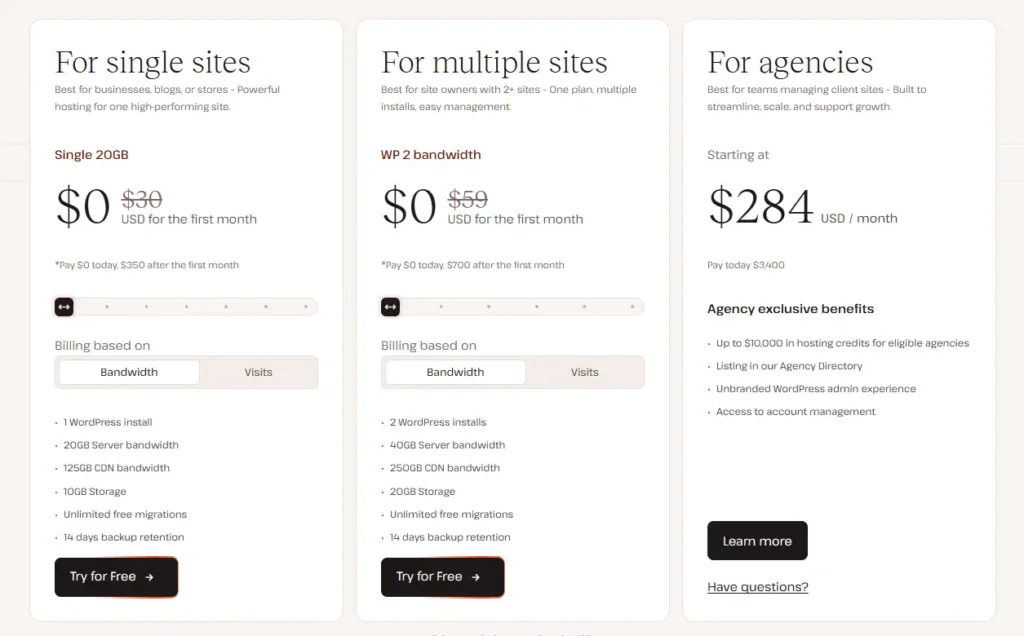
Kinsta looks simple, but it gets expensive when your site grows.
You pay based on plan limits such as installs, bandwidth, storage, CDN usage, and traffic model. If you run one important website, the price is fine. If you manage many small sites, it can add up quickly.
The cheapest plan is not built for unlimited projects.
So do not buy Kinsta thinking it is budget hosting. It is not.
Cloudways Pricing Trap
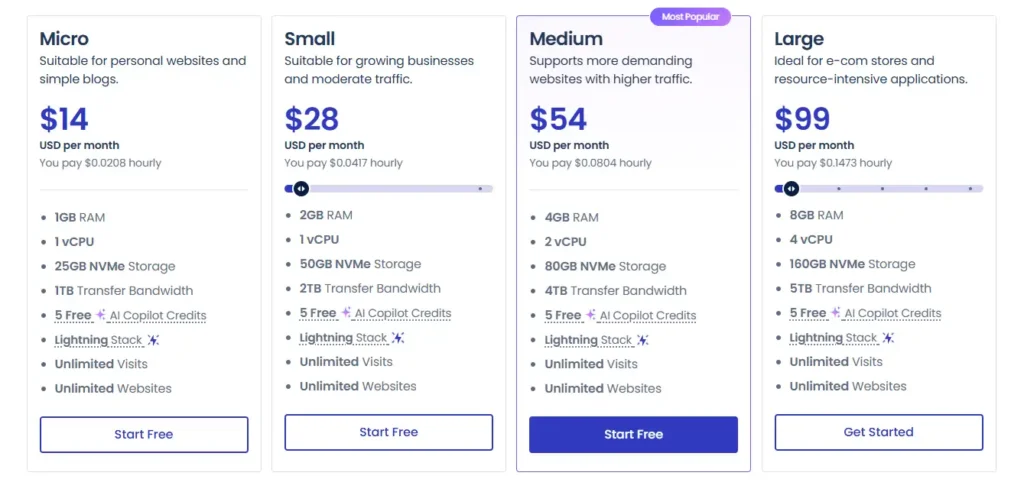
Cloudways starts cheaper, but the final bill depends on what you add.
Your cost can increase through:
- Bigger servers
- More bandwidth
- Offsite backups
- Cloudflare add-on
- Premium support
- Email add-ons
- Scaling during traffic spikes
Still, Cloudways is usually better value if you know what you are doing.
For the keyword Best affordable hosting 2026, Cloudways fits better than Kinsta. Kinsta is premium. Cloudways is the affordable cloud option.
Kinsta vs Cloudways Customer Support
Support matters when your site breaks at the worst possible time.
Kinsta Support
Kinsta support is one of its strongest points.
You get WordPress-focused support. They understand caching, plugins, migrations, PHP errors, redirects, and performance issues. You are not usually dealing with a generic hosting agent reading from a script.
That matters.
If you run a business site, the higher price feels more reasonable when support actually solves problems.
Cloudways Support
Cloudways support is good for basic and mid-level hosting issues.
They can help with SSL, server settings, migrations, backups, and platform questions. But for deeper application problems, plugin conflicts, code issues, or advanced optimization, you may hit limits unless you pay for higher support tiers.
That does not make Cloudways bad.
It just means Cloudways expects you to be more technical.
Winner: Kinsta for support depth. Cloudways for users who can handle more themselves.
Kinsta vs Cloudways Security and Backups
Both providers cover the basics, but Kinsta bundles more into the premium price.
Kinsta Security
Kinsta includes:
- Free SSL
- Cloudflare protection
- DDoS protection
- Firewall protection
- Malware monitoring
- Free malware removal
- Daily backups
- Staging environments
- Isolated containers
This is one reason I like Kinsta for business sites. Security is not treated like an afterthought.
Cloudways Security
Cloudways includes:
- Free SSL
- Dedicated firewalls
- Security patching
- Bot protection options
- Two-factor authentication
- Automated backups
- Staging environments
- Server monitoring
The catch is backups and add-ons. Offsite backup storage may cost extra. Cloudflare Enterprise is also an add-on.
Cloudways gives you a solid setup, but you need to read the billing details.
Winner: Kinsta for included security. Cloudways for flexible control.
Kinsta vs Cloudways Migration Experience
Migration is where Kinsta feels easier.
Kinsta offers free migrations handled by their team. You request the migration, provide details, and they move your site. For business owners, this is a relief.
Cloudways also offers migration help and a migration plugin for WordPress. It is not hard, but the experience feels more self-service.
If you are moving one important site, Kinsta is smoother.
If you are moving many smaller sites and know WordPress, Cloudways is fine.
Winner: Kinsta for hands-off migration.
Which One Is Better for Beginners?
Kinsta is better for beginners who have the budget.
The dashboard is cleaner. The support is stronger. The WordPress setup is easier. You do not need to think much about server tuning.
Cloudways is not impossible for beginners, but it has more decisions.
You need to choose a provider. Choose server size. Understand applications. Learn caching. Watch backup settings. Add CDN if needed.
That is not hard for a technical person.
But for a beginner starting a simple blog, it may feel like too much.
Beginner pick: Kinsta if budget allows. Cloudways if you want to learn and save money.
Which One Is Better for Business and Ecommerce?
For business and ecommerce, I lean toward Kinsta.
WooCommerce sites need stable performance. They also need reliable backups, good support, strong security, and fewer moving parts.
Kinsta is built for that.
Cloudways can also run WooCommerce very well. In fact, a properly configured Cloudways server can handle serious stores. But you need to manage resources carefully.
If your store is making real money, Kinsta is the safer pick.
If you are building a lean ecommerce store and want to control costs, Cloudways is better value.
Business pick: Kinsta
Budget ecommerce pick: Cloudways
Real-World Scenario: If I Were Starting a Niche Blog With a $50 Budget
If I were starting a niche blog today with a $50 monthly budget, I would choose Cloudways.
Here is why.
A new niche blog does not need premium managed WordPress hosting from day one. Most new blogs need good speed, clean uptime, and room to grow without wasting money.
With Cloudways, I could start on a smaller cloud server, install WordPress, use a lightweight theme, set up caching, connect Cloudflare, and keep costs controlled.
That leaves money for things that matter more early on:
- Content
- Keyword research
- Internal links
- Images
- Basic SEO tools
- Email capture
- Link building
Kinsta is better once the site earns money.
For a new site, Cloudways is the smarter financial move.
Final Verdict: Kinsta vs Cloudways Winner for 2026
The winner of Kinsta vs Cloudways in 2026 is Kinsta, but with one big condition.
Kinsta wins if you care more about stability, support, security, and a clean WordPress experience than saving every dollar.
It is the better choice for serious WordPress websites, agencies, WooCommerce stores, and businesses that cannot afford messy hosting problems.
Cloudways is still the better value pick.
If you are building a niche blog, managing multiple smaller sites, or want the best affordable hosting 2026 option between these two, Cloudways makes more sense.
Here is my honest recommendation:
- Choose Kinsta if your site already makes money or supports a real business.
- Choose Cloudways if you want strong performance at a lower monthly cost.
- Choose Kinsta if you hate server work.
- Choose Cloudways if you like control.
- Choose Kinsta for premium WordPress support.
- Choose Cloudways for flexible cloud hosting.
For my own business site, I would choose Kinsta.
For a new affiliate blog with a limited budget, I would choose Cloudways.
We track the latest deals for both providers; check our coupon section before you buy.
FAQs About Kinsta vs Cloudways
1. Does Kinsta offer a free domain?
No. Kinsta does not offer a free domain. You need to buy your domain from a domain registrar and connect it to Kinsta.
2. Is Cloudways good for WordPress?
Yes. Cloudways is very good for WordPress, especially if you want cloud hosting with better control than shared hosting. It works well for blogs, affiliate sites, business websites, and WooCommerce stores.
3. Which is faster, Kinsta or Cloudways?
Kinsta is usually faster out of the box because the platform is highly optimized and includes edge caching. Cloudways can be just as fast, or faster in some cases, if you configure the server, caching, CDN, and resources correctly.
4. Is Kinsta worth the higher price?
Yes, Kinsta is worth it if your website earns money or supports a business. If you only run a small hobby blog, it may be too expensive.
5. Is Cloudways beginner-friendly?
Cloudways is beginner-friendly compared to unmanaged VPS hosting, but it is not as simple as Kinsta. You still need to understand servers, applications, backups, caching, and scaling at a basic level.
6. Which is better for WooCommerce, Kinsta or Cloudways?
Kinsta is better for WooCommerce if you want a stable premium setup with strong support. Cloudways is better if you want more control and lower costs, but you should know how to manage resources properly.
7. Which one should I choose in 2026?
Choose Kinsta if you want the safer premium WordPress hosting experience. Choose Cloudways if you want better value, more server control, and lower starting costs.