
GreenGeeks is one of those hosting companies that stands out for a very clear reason. It is not only selling web hosting. It is selling faster websites, beginner friendly tools, WordPress support, and a cleaner hosting footprint.
That last point is what makes GreenGeeks different from most low cost hosting providers. The company says it matches 300% of the energy it uses with renewable energy credits and plants one tree for every new hosting account. For website owners who care about speed, price, and sustainability, that makes GreenGeeks a serious option.
But eco friendly hosting alone is not enough. A hosting company still has to perform well. It needs reliable uptime, easy WordPress setup, proper security, good support, fair renewal pricing, and enough resources for a growing website.
In this GreenGeeks review, we will look at its pricing, features, plan limits, WordPress hosting, performance tools, support, pros, cons, and how it compares with similar hosting providers like Hostinger, Bluehost, SiteGround, and DreamHost.
GreenGeeks Review Summary
GreenGeeks is best for bloggers, small business owners, affiliate marketers, WordPress users, agencies, and anyone who wants reliable shared hosting with a greener approach.
Its plans are simple, the entry price is fair, and even the basic Lite plan includes useful features like free SSL, free domain for the first year, unmetered traffic, daily backups, Cloudflare CDN, cPanel, and email hosting.
The biggest reason to choose GreenGeeks is the balance between features and sustainability. Many cheap hosting companies give you a low starting price but cut corners on backups, email, migration, or security. GreenGeeks includes many of these basics without making the platform feel too complicated.
The main downside is renewal pricing. Like most hosting companies, GreenGeeks gives a strong discount for the first billing term, then renews at a higher standard rate. So, it is affordable at signup, but you should check the renewal price before buying.
What Is GreenGeeks?

GreenGeeks is a web hosting company that offers shared hosting, WordPress hosting, WooCommerce hosting, VPS hosting, reseller hosting, and website hosting tools for small to medium websites.
Its biggest identity is green hosting. Instead of only talking about low prices, GreenGeeks focuses on reducing the environmental impact of web hosting. The company works with renewable energy programs and tree planting projects, which makes it attractive for businesses that want to lower their website carbon footprint.
GreenGeeks hosting is built for common website needs like:
- Personal blogs
- Affiliate websites
- Small business websites
- WordPress websites
- WooCommerce stores
- Portfolio sites
- Local service websites
- Agency client websites
- Small to growing online stores
It is not the cheapest host in every category, and it is not a premium enterprise host like WP Engine or Kinsta. GreenGeeks sits in the middle. It gives beginners affordable hosting, but it also includes enough tools for growing websites.
GreenGeeks Pricing Overview
GreenGeeks has three main shared hosting plans: Lite, Pro, and Premium. These same price levels also apply to its WordPress hosting and WooCommerce hosting plans.
Here is the current pricing table.
| GreenGeeks Plan | Intro Price | Renewal Price | Websites | Storage | Traffic | Best For |
|---|---|---|---|---|---|---|
| Lite | $2.95 per month | $13.95 per month | 1 website | 25 GB web space | Unmetered | Small blogs and starter websites |
| Pro | $4.95 per month | $18.95 per month | Unlimited websites | 50 GB web space | Unmetered | Growing blogs and small businesses |
| Premium | $8.95 per month | $30.95 per month | Unlimited websites | 100 GB web space | Unmetered | Busy websites and online stores |
These prices are based on the 12 month promotional term. GreenGeeks usually charges the full first term upfront, so your checkout total will be higher than the monthly number shown on the pricing page.
GreenGeeks Shared Hosting Plans Explained
1. Lite Plan
The Lite plan is the cheapest GreenGeeks plan. It is made for one website, so it works well if you are starting a blog, portfolio, local business site, or small affiliate site.
You get 25 GB web space, unmetered traffic, 50 email accounts, free SSL, free domain for the first year, Cloudflare CDN, daily backups, cPanel, and one click app installs.
This plan is good if your site is new and does not need many resources. It is not the best choice if you want to host multiple websites or run a store with many products.
Best for:
- New bloggers
- Small portfolio sites
- Personal websites
- Local business landing pages
- One website owners
2. Pro Plan
The Pro plan is the most practical choice for many users. It allows unlimited websites and increases storage to 50 GB. You also get more server resources than the Lite plan, which helps if your site is growing.
If you manage multiple blogs, small business sites, or affiliate websites, Pro makes more sense than Lite. The price difference at signup is small, but the flexibility is much better.
Best for:
- Multiple website owners
- Small businesses
- Content websites
- Affiliate marketers
- Growing WordPress blogs
3. Premium Plan
The Premium plan is made for busier websites and online stores. It gives you 100 GB web space, unlimited websites, more resources, premium SSL included, and stronger limits for traffic handling.
This plan is useful if your website is already getting traffic, if you run WooCommerce, or if you want better resource allocation without moving to VPS hosting.
Best for:
- Online stores
- High traffic blogs
- Business websites
- WooCommerce users
- Website owners who need more resources
GreenGeeks Hosting Types and Pricing
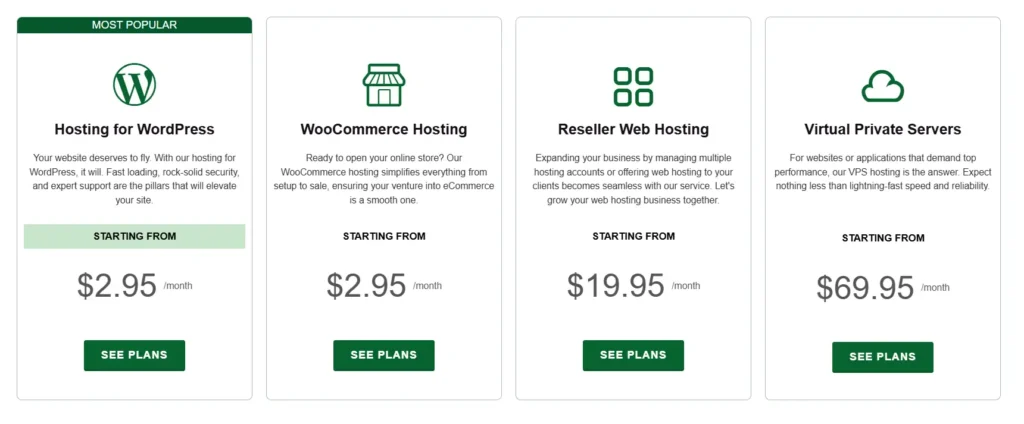
GreenGeeks is not limited to shared hosting. It also offers WordPress, WooCommerce, reseller, and VPS hosting.
| Hosting Type | Starting Price | Main Use Case |
|---|---|---|
| Shared Hosting | $2.95 per month | Regular websites, blogs, and small business sites |
| WordPress Hosting | $2.95 per month | WordPress blogs and business websites |
| WooCommerce Hosting | $2.95 per month | Small online stores |
| Reseller Hosting | $19.95 per month on 12 month term | Agencies and freelancers hosting client sites |
| Managed VPS Hosting | $69.95 per month | Larger sites needing dedicated resources |
GreenGeeks Reseller Hosting Pricing
Reseller hosting is useful if you want to host client websites under your own service setup. GreenGeeks has three reseller plans.
| Reseller Plan | Intro Price On 12 Month Term | Renewal Price | Disk Space | Bandwidth | cPanel Accounts |
|---|---|---|---|---|---|
| RH 25 | $19.95 per month | $34.95 per month | 60 GB | 600 GB | 25 |
| RH 50 | $24.95 per month | $49.95 per month | 80 GB | 800 GB | 50 |
| RH 80 | $34.95 per month | $69.95 per month | 160 GB | 1600 GB | 80 |
This is a good option for agencies, developers, and freelancers who want to manage multiple client websites with separate cPanel accounts.
GreenGeeks VPS Hosting Pricing
GreenGeeks VPS hosting is fully managed and starts at a much higher price than shared hosting. It is meant for websites that need dedicated resources, stronger control, and better traffic handling.
| VPS Plan | Price | vCPU | RAM | Storage | Best For |
|---|---|---|---|---|---|
| 4 GB VPS | $69.95 per month | 4 vCPU | 4 GB RAM | 75 GB SSD | Growing websites |
| 8 GB VPS | $129.95 per month | 6 vCPU | 8 GB RAM | 150 GB SSD | Busy stores and apps |
| 16 GB VPS | $179.95 per month | 6 vCPU | 16 GB RAM | 250 GB SSD | Larger websites and heavy workloads |
The VPS plans include cPanel, free SSL, free migration, managed support, and 30 day money back guarantee. If you are running a small blog, you do not need VPS. If your site is slowing down on shared hosting, VPS becomes worth considering.
Detailed GreenGeeks Features Table
| Feature | Lite | Pro | Premium |
|---|---|---|---|
| Websites | 1 | Unlimited | Unlimited |
| Web Space | 25 GB | 50 GB | 100 GB |
| Traffic | Unmetered | Unmetered | Unmetered |
| Email Accounts | 50 | Unlimited | Unlimited |
| Free Domain First Year | Yes | Yes | Yes |
| Free SSL | Yes | Yes | Yes |
| Premium SSL | Add on | Add on | Included |
| Cloudflare CDN | Yes | Yes | Yes |
| Daily Backups | Yes | Yes | Yes |
| MySQL Databases | Unlimited | Unlimited | Unlimited |
| cPanel | Yes | Yes | Yes |
| Developer Tools | Yes | Yes | Yes |
| CPU Cores | 2 | 3 | 4 |
| Physical Memory | 1 GB | 2 GB | 3 GB |
| Inodes | 200,000 | 400,000 | 600,000 |
| Email Sending Limit | 100 per hour | 300 per hour | 500 per hour |
Key Features of GreenGeeks

1. Eco Friendly Hosting With 300% Renewable Energy Match
This is the main reason many users look at GreenGeeks first. Web hosting needs servers, cooling, networks, and data centers, all of which use energy. GreenGeeks tries to balance this by matching 300% of its energy use with renewable energy credits.
It also plants one tree for every new hosting account. This does not make your website faster, but it does make GreenGeeks more meaningful for brands that care about sustainability.
For businesses with environmental messaging, wellness brands, travel blogs, nonprofit websites, and eco focused companies, this can be a strong branding advantage.
2. Free Domain For The First Year
GreenGeeks includes a free domain for the first year on its shared hosting plans. This helps reduce the startup cost for new websites.
You should remember that the domain renews separately after the first year. This is common in hosting, but many beginners forget to calculate domain renewal into their yearly budget.
3. Free SSL Certificate
Every GreenGeeks plan includes free SSL. SSL is needed to secure your website and show HTTPS in the browser.
This is now a basic requirement for trust, SEO, forms, checkout pages, and login pages. GreenGeeks uses automatic SSL deployment, which makes it easier for beginners.
4. LiteSpeed, LSCache, SSD Storage, and CDN
GreenGeeks uses speed focused technologies like SSD storage, LiteSpeed web server, MariaDB, LSCache, Cloudflare CDN, HTTP/3, and PHP 8.
For WordPress websites, LiteSpeed Cache can be very useful. It helps with page caching, browser caching, image optimization, and other speed improvements.
Speed depends on many things, including your theme, plugins, images, scripts, and page builder. Still, GreenGeeks gives you a strong base for a fast WordPress site.
5. Daily Backups
Daily backups are included with GreenGeeks plans. This is important because mistakes happen. Plugins break. Updates fail. Files get deleted. Malware can damage a website.
Having daily backups gives you a safety net. Some hosts charge extra for backups, so it is good to see them included here.
For serious business websites, you should still keep your own offsite backup. Do not rely only on hosting backups.
6. cPanel Control Panel
GreenGeeks uses cPanel, which is familiar to many website owners. You can manage files, databases, email accounts, domains, SSL, backups, and other hosting settings from one place.
Many beginners find cPanel easier because there are many tutorials available online. Developers also like it because it gives direct access to common hosting tools.
7. One Click App Installer
GreenGeeks includes a one click installer for WordPress and other apps. This makes it easy to start a website without manual file uploads or database setup.
For most users, WordPress will be the main app. You can install it, choose a theme, add plugins, and start building pages quickly.
8. Free Website Migration
GreenGeeks offers migration help for users moving from another host. This can save time if you already have a website and do not want to handle files, databases, and DNS changes yourself.
Migration support is especially useful for business owners who cannot afford downtime or broken pages.
9. Email Hosting Included
GreenGeeks includes email hosting, which is helpful if you want email addresses like hello at yourdomain.com.
The Lite plan includes 50 email accounts. Pro and Premium include unlimited email accounts. For small businesses, this can reduce the need to pay separately for basic email hosting.
That said, if email deliverability is very important, you may still prefer dedicated email services like Google Workspace or Microsoft 365.
10. Developer Friendly Tools
GreenGeeks includes tools like SSH, Git, WP CLI, SFTP, phpMyAdmin, staging, and multiple PHP versions. These features are useful for developers and advanced WordPress users.
This means GreenGeeks is not only for beginners. It can also work for users who want more control over their website environment.
GreenGeeks WordPress Hosting Review
GreenGeeks WordPress hosting uses the same Lite, Pro, and Premium plan structure. The difference is that the hosting environment is positioned for WordPress users.
You get one click WordPress installation, automatic updates, WordPress security tools, LiteSpeed optimization, CDN support, daily backups, and WordPress support.
For a beginner WordPress user, GreenGeeks is easy enough to start with. You can install WordPress quickly, use cPanel, set up SSL, and start building your site.
For affiliate marketers and bloggers, the Pro plan is usually the best fit because it allows unlimited websites. For online stores, Premium is safer because it gives more resources.
GreenGeeks WooCommerce Hosting Review
GreenGeeks also offers WooCommerce hosting. This is useful if you want to create an online store using WordPress and WooCommerce.
The Premium plan is the better choice for WooCommerce because stores usually need more resources than simple blogs. Product pages, cart pages, checkout pages, payment plugins, and customer sessions can put more load on the server.
GreenGeeks is fine for small WooCommerce stores. For a large store with heavy traffic, you may want VPS or a more advanced managed WooCommerce host.
GreenGeeks Performance
GreenGeeks has a good performance setup for shared hosting. LiteSpeed, SSD storage, LSCache, CDN support, and modern PHP versions all help with speed.
For small to medium websites, this is enough. If you use a clean theme, compress images, avoid too many plugins, and set up caching properly, GreenGeeks can deliver solid loading times.
The important thing to understand is that shared hosting still shares server resources with other users. The Premium plan has more resources than Lite, but it is still shared hosting. For very high traffic websites, VPS hosting is the better option.
GreenGeeks Security
GreenGeeks includes free SSL, security monitoring, firewall protection, DDoS protection, automatic updates for WordPress, and daily backups.
This is a good starting security setup. It protects normal websites from many common issues.
Still, website security is not only the host’s job. You should also use strong passwords, update plugins, remove unused themes, install a trusted security plugin, and avoid nulled themes or plugins.
GreenGeeks Customer Support
GreenGeeks offers 24/7 support. This is useful for beginners who may need help with DNS, WordPress setup, SSL, email, migration, or cPanel settings.
Support quality can vary with any hosting company, but GreenGeeks does offer enough support channels and documentation for most common issues.
For beginners, this is important. A cheap host with poor support can cost more in lost time than it saves in monthly fees.
GreenGeeks Pros and Cons
Pros
- 300% renewable energy match
- One tree planted for every new hosting account
- Free domain for the first year
- Free SSL included
- Daily backups included
- LiteSpeed server and LSCache support
- Cloudflare CDN included
- cPanel included
- Email hosting included
- Free website migration
- 30 day money back guarantee
- Good plan options for blogs, small businesses, and agencies
Cons
- Renewal prices are much higher than intro prices
- Lite plan supports only one website
- Premium SSL is included only on the Premium plan
- VPS hosting is more expensive than beginner shared hosting
- Shared hosting is not ideal for very high traffic sites
- Some advanced users may want more cloud flexibility
GreenGeeks vs Similar Hosting Providers
| Hosting Provider | Starting Price | Renewal Price | Storage On Entry Plan | Control Panel | Best For |
|---|---|---|---|---|---|
| GreenGeeks | $2.95 per month | $13.95 per month | 25 GB | cPanel | Eco friendly hosting and WordPress sites |
| Hostinger | $2.99 per month | $10.99 per month | 20 GB SSD | hPanel | Low cost hosting with modern tools |
| SiteGround | $2.99 per month | $17.99 per month | 10 GB | Site Tools | WordPress support and performance |
| DreamHost | $2.89 per month | $10.99 per month | 25 GB NVMe | Custom panel | Simple hosting with clear renewal pricing |
| Bluehost | Renewal from $11.99 per month on 12 month Starter term | Varies by plan | Varies by plan | Custom dashboard and cPanel tools | Beginner WordPress users |
GreenGeeks vs Hostinger
Hostinger is usually better for users who want the lowest long term entry cost and a modern custom dashboard. It also gives a very beginner friendly setup.
GreenGeeks is better if you want cPanel, eco friendly hosting, strong email limits, daily backups, and renewable energy matching.
Choose GreenGeeks if sustainability and cPanel matter more. Choose Hostinger if you want a lower renewal price and a simpler custom dashboard.
GreenGeeks vs SiteGround
SiteGround is known for strong WordPress performance, support, and its own hosting tools. It is a very polished platform, but its renewal pricing is higher.
GreenGeeks is more affordable on renewal than SiteGround’s entry plan and has a stronger eco friendly identity.
Choose SiteGround if you want a premium shared hosting experience. Choose GreenGeeks if you want better value with green hosting benefits.
GreenGeeks vs DreamHost
DreamHost is simple, clear, and beginner friendly. It also has strong renewal transparency and a custom dashboard.
GreenGeeks offers cPanel, LiteSpeed, eco friendly hosting, email features, and renewable energy matching.
Choose DreamHost if you want a simple dashboard and straightforward plans. Choose GreenGeeks if you want cPanel and eco friendly hosting.
GreenGeeks vs Bluehost
Bluehost is popular among WordPress beginners and has a very guided setup process. It is often chosen by users who want a familiar hosting brand.
GreenGeeks gives more focus to sustainability, daily backups, LiteSpeed, cPanel, and green energy matching.
Choose Bluehost if you want a beginner focused WordPress setup. Choose GreenGeeks if you want greener hosting with strong shared hosting features.
Who Should Use GreenGeeks?
GreenGeeks is a good choice for:
- Bloggers who want affordable WordPress hosting
- Affiliate marketers running content sites
- Small businesses that need email and hosting together
- Website owners who care about sustainability
- Agencies that need reseller hosting
- Freelancers managing client websites
- Beginners who want cPanel and support
- WooCommerce store owners starting small
- It is not the best choice for:
- Large enterprise websites
- Apps needing complex cloud infrastructure
- High traffic stores that need dedicated scaling
- Users who want the absolute cheapest renewal rate
- Developers who prefer unmanaged VPS control
Is GreenGeeks Worth It?
Yes, GreenGeeks is worth it if you want affordable hosting with strong basic features and a real eco friendly angle. The plans include many things that beginners and small businesses need, such as free SSL, free domain for the first year, email hosting, daily backups, CDN, cPanel, and WordPress tools.
The Pro plan gives the best balance for most users because it supports unlimited websites and has better resources than Lite. The Lite plan is fine for one small website. The Premium plan makes sense for online stores or busier websites.
The renewal pricing is the main thing to watch. GreenGeeks is cheap at signup, but the price increases after the first term. This is normal in hosting, but you should plan for it before buying.
Final Verdict
GreenGeeks is a strong hosting provider for users who want reliable shared hosting, WordPress tools, cPanel, daily backups, and a cleaner hosting footprint.
It is not just a green branding story. The hosting plans are practical. You get useful features, good storage limits, email hosting, security tools, free migration, and clear plan upgrades.
If you are starting a blog, business website, affiliate site, or small online store, GreenGeeks is a solid choice. For most users, the Pro plan is the best value because it allows unlimited websites and gives more room to grow.
GreenGeeks is best for people who want hosting that is simple, feature rich, and more sustainable than the usual low cost shared hosting option.