
Choosing between Cloudways vs SiteGround is confusing because both look strong on paper, but they are built for different people.
SiteGround feels easier when you are starting a blog, business website, or basic WordPress site. Cloudways feels better when you care about raw performance, server control, scaling, and long term value.
Quick Winner: For 2026, I would pick Cloudways as the overall winner because it gives better control, better scaling, and more predictable long term pricing. But if you are a beginner and want hosting, domain, email, backups, and WordPress setup in one place, SiteGround is still the easier choice.
This Cloudways review and SiteGround review will help you choose based on your real use case, not just the cheapest monthly price.
Quick Comparison Table: Cloudways vs SiteGround
| Feature | Cloudways | SiteGround |
|---|---|---|
| Starting Price | From $11/month on DigitalOcean | From $2.99/month promo |
| Renewal Pricing | No classic renewal hike, pay as you go | Renews much higher after promo |
| Hosting Type | Managed cloud hosting | Managed shared and cloud hosting |
| Server Technology | NGINX, Apache, Varnish, Redis, PHP-FPM stack | Google Cloud, NGINX caching, custom PHP, SiteGround optimizer |
| Free Domain | No | Yes, on many hosting plans |
| Free Email | No, paid add-on | Yes |
| Backups | Automated backups, offsite storage charged separately | Daily backups included |
| CDN | Cloudflare add-on | Free CDN included |
| Ease of Use | Medium | Easier |
| Best For | Growing sites, WooCommerce, agencies, developers | Beginners, small business sites, simple WordPress blogs |
| Overall 2026 Pick | Best for performance and scaling | Best for simple setup |
Cloudways: Cloudways Deep Dive

Cloudways is not normal shared hosting. That is the first thing you need to understand.
When you buy Cloudways, you are not placed on a cheap shared server with hundreds of random websites. You choose cloud infrastructure like DigitalOcean, Vultr, Linode, AWS, or Google Cloud, then Cloudways manages the server for you.
That is why Cloudways is popular with WordPress users who have outgrown beginner hosting.
Key Cloudways Features
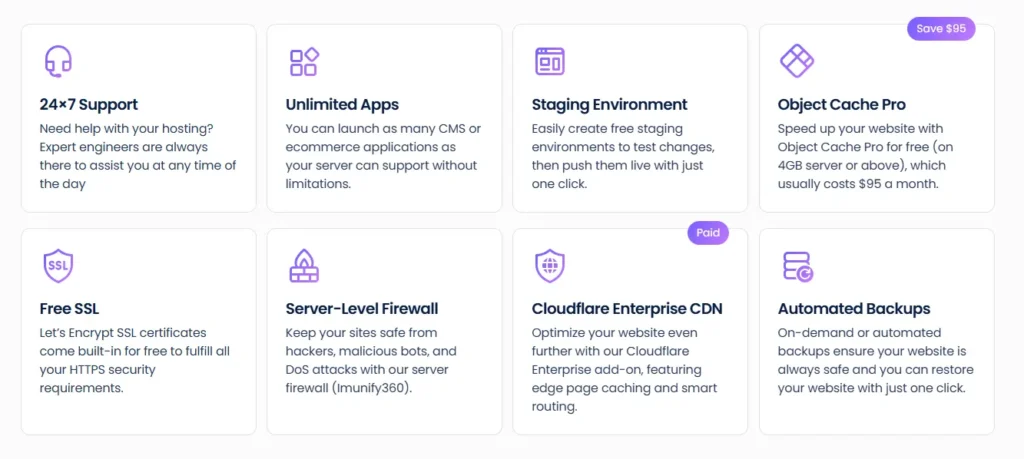
Cloudways gives you:
- Managed cloud servers
- Free SSL certificates
- Free migration
- Staging environment
- Vertical scaling
- Server level caching
- Varnish, Redis, Memcached, NGINX, Apache, and PHP-FPM
- Dedicated firewalls
- SSH and SFTP access
- Team management
- 24/7 support
- Pay as you go billing
The biggest benefit is control. You can scale server resources without moving to a totally different hosting company. That matters for ecommerce, affiliate sites, agencies, and blogs that get traffic spikes.
Why Cloudways Is Popular
Cloudways became popular because it gives you cloud hosting without forcing you to become a server admin.
You get better performance than cheap shared hosting, but you do not have to manage Linux updates, firewalls, stack setup, or caching from scratch.
For developers, Cloudways feels flexible. You get Git, SSH, staging, cron jobs, PHP version control, Redis, and server monitoring.
For non technical users, the dashboard is still manageable, but there is a learning curve.
Cloudways Pros
- Strong performance for the money
- Real cloud resources
- Easy vertical scaling
- No traditional renewal price shock
- Good for high traffic WordPress sites
- Good for WooCommerce
- Good server control
- Free SSL and migration
- Staging included
- You can host multiple apps on one server
Cloudways Cons
- No free domain
- No free email hosting
- Backups can add small extra costs
- Cloudflare Enterprise add-on costs extra
- Beginners may feel overwhelmed at first
- Support is good, but deeper support can require paid support add-ons
Who Should Buy Cloudways?
Buy Cloudways if you want speed, control, and room to grow.
I would recommend Cloudways for:
- Affiliate sites with serious traffic
- WooCommerce stores
- Agencies managing client sites
- Developers
- Membership sites
- LMS websites
- Bloggers who already understand WordPress basics
- Anyone moving away from slow shared hosting
Cloudways is not the simplest hosting. But it is one of the best affordable hosting 2026 options if you care about value for performance.
SiteGround: SiteGround Deep Dive

SiteGround is more beginner friendly. It gives you a more complete hosting package from day one.
You get hosting, domain, email, SSL, backups, CDN, WordPress installer, website builder, and support in one place.
That makes SiteGround less intimidating than Cloudways.
Key SiteGround Features

SiteGround includes:
- Free domain on many plans
- Free SSL
- Free CDN
- Free email
- Daily backups
- Managed WordPress updates
- SiteGround Site Tools dashboard
- Website builder
- WordPress migration tools
- Staging on higher plans
- Custom caching
- 24/7 support
SiteGround’s unique selling point is convenience. You do not have to connect five services just to launch a basic website.
For a beginner, that matters.
SiteGround’s Unique Selling Point
SiteGround is good at packaging hosting in a clean way.
The dashboard is called Site Tools. It replaced cPanel years ago. Some old users still miss cPanel, but Site Tools is cleaner for beginners.
You can manage domains, SSL, emails, backups, caching, WordPress tools, databases, and security from one dashboard.
That is why many beginners like SiteGround.
SiteGround Pros
- Very beginner friendly
- Free domain on many plans
- Free email included
- Daily backups included
- Free CDN
- Good WordPress tools
- Clean Site Tools dashboard
- Helpful support
- Good for small business websites
- Simple setup process
SiteGround Cons
- Renewal prices are high
- Entry plan has limited storage
- Shared hosting resources are still shared
- Staging is not available on the cheapest plan
- Not as scalable as Cloudways
- Advanced users may feel limited
- Cloud hosting plans are expensive
Who Should Buy SiteGround?
Buy SiteGround if you want easy hosting and do not want to think too much about servers.
I would recommend SiteGround for:
- New bloggers
- Local business websites
- Portfolio websites
- Small WordPress sites
- Beginners who want email included
- Users who want a free domain
- Non technical site owners
- Small stores with light traffic
This SiteGround review section is simple: SiteGround is not the cheapest after renewal, but it is one of the easiest hosts to start with.
Cloudways vs SiteGround Performance: Speed, Uptime, and Server Tech
Performance is where Cloudways starts pulling ahead.
A fair Cloudways vs SiteGround speed test should use the same WordPress theme, same plugins, same page size, same test region, same caching setup, and same CDN status.
If you test Cloudways with server side caching and Redis enabled, it usually has stronger TTFB potential than SiteGround shared hosting. That is because Cloudways gives you dedicated cloud resources based on your server plan.
SiteGround can still be fast. Its Google Cloud setup, NGINX caching, custom PHP, and Speed Optimizer plugin are solid. But on shared hosting, you are still sharing resources.
Server Technology
Cloudways uses a performance stack with NGINX, Apache, Varnish, Redis, Memcached, MariaDB or MySQL, and PHP-FPM.
SiteGround uses Google Cloud infrastructure, NGINX Direct Delivery, dynamic caching, Memcached, custom PHP, and its own WordPress optimization plugin.
Now, one correction: this is not really a LiteSpeed vs Apache battle.
Neither Cloudways nor SiteGround is a pure LiteSpeed host like Hostinger or A2 Turbo plans. Cloudways uses NGINX plus Apache with Varnish and cache layers. SiteGround uses NGINX based caching and its own stack.
Uptime
Both hosts are reliable enough for serious WordPress sites.
Cloudways depends partly on the cloud provider you choose. DigitalOcean, Vultr, AWS, and Google Cloud all have strong infrastructure, but your server setup still matters.
SiteGround claims strong uptime and has a good record for small business hosting. For a normal blog, uptime should not be your worry with either host.
The real difference is how each platform handles growth.
Cloudways gives you more room to scale. SiteGround is easier until your site starts needing more resources.
Cloudways vs SiteGround User Interface: Dashboard Experience
This section matters more than beginners think.
A fast host is useless if you cannot manage it.
Cloudways Dashboard
Cloudways has a custom dashboard. It is clean, but it is not as beginner focused as SiteGround.
You will see terms like:
- Servers
- Applications
- Vertical scaling
- Varnish
- Redis
- PHP-FPM
- Cron jobs
- SSH keys
- Monitoring
- Services
If you know WordPress basics, this is fine. If you are brand new, it can feel technical.
The good part is that most important tasks are still a few clicks away.
You can install WordPress, add SSL, set backups, clone sites, create staging, manage domains, and scale servers without touching command line.
SiteGround Site Tools
SiteGround is easier.
You do not get cPanel anymore. You get Site Tools.
Site Tools is built for website owners, not server admins. It feels more guided. You can install WordPress, create emails, manage SSL, restore backups, turn on caching, and access file manager without confusion.
For beginners, SiteGround wins this round.
For developers, Cloudways wins because it gives more control.
Cloudways vs SiteGround Pricing and Renewal Hikes
This is where buyers make mistakes.
SiteGround looks much cheaper at first. The StartUp plan often starts around a low promo price. GrowBig and GoGeek also look attractive during the first term.
But the renewal price is the catch.
That cheap first year can become much more expensive later. This is common in shared hosting, but SiteGround’s jump is noticeable.
Cloudways starts higher. The entry DigitalOcean plan costs more than SiteGround’s promo price. But Cloudways does not use the same first year discount trap. You pay monthly or hourly based on usage.
Real Pricing Difference
SiteGround is cheaper on day one.
Cloudways is often better after the first year.
For example:
- SiteGround is better if your budget is tiny and you need domain plus email.
- Cloudways is better if you already have a domain and care about long term hosting value.
- SiteGround renewal can hurt small sites.
- Cloudways add-ons can increase the bill, but the base pricing is more predictable.
That is why I see Cloudways as better value for serious sites.
Customer Support: Which One Helps Better?
Both offer 24/7 support, but the style is different.
SiteGround Support
SiteGround support is beginner friendly. They are good at helping with WordPress setup, SSL, email, domain issues, and general hosting problems.
If you are new and confused, SiteGround support usually feels easier to deal with.
Cloudways Support
Cloudways support is more technical. They are used to dealing with server resources, caching, PHP issues, application performance, and cloud setup.
The basic support is good for normal issues. But if you want deeper application level help or faster priority response, Cloudways pushes paid support add-ons.
For beginners, SiteGround wins support.
For technical users, Cloudways support is more useful.
Security and Backups: What Is Free and What Costs Extra?
Security is strong on both, but the packaging is different.
Cloudways Security
Cloudways includes:
- Free SSL
- Dedicated firewalls
- Regular security patching
- Bot protection options
- Two factor authentication
- Automated backups
- Malware protection add-on
- Cloudflare Enterprise add-on
The downside is that some advanced security features cost extra.
Backups are automated, but offsite backup storage is billed separately. It is usually a small cost, but it is still not fully free.
SiteGround Security
SiteGround includes:
- Free SSL
- Daily backups
- Web application firewall
- AI anti bot system
- Automatic WordPress updates
- Enhanced security tools
- 30 days of backup history on many plans
For beginners, SiteGround’s security package feels easier because more things are bundled.
For high traffic sites, Cloudways gives more control.
Migration Experience
SiteGround makes migration simple for basic WordPress sites.
You can use its WordPress migrator or request help depending on the plan and offer. For a simple blog, the migration is usually easy.
Cloudways also offers free migration, and its migration plugin works well for WordPress. But you need to understand domain pointing, DNS, SSL, and application settings.
If you have a small blog, SiteGround is easier.
If you have a WooCommerce site, agency site, or high traffic blog, Cloudways is better because you can test the migration on staging and tune the server before going live.
Which One Is Better for Beginners?
SiteGround is better for beginners.
No debate here.
You get:
- Easier dashboard
- Free domain
- Free email
- WordPress installer
- Daily backups
- Free SSL
- Free CDN
- Helpful support
- Less technical setup
If you are starting your first blog, SiteGround will feel less stressful.
Cloudways is not hard, but it expects you to understand a few hosting basics. You should know what DNS is, how SSL works, what server size means, and why caching matters.
Which One Is Better for Business and Ecommerce?
Cloudways is better for business and ecommerce.
WooCommerce sites need resources. They also need stable checkout performance, database speed, object caching, and room to scale.
Cloudways gives you more control over:
- RAM
- CPU
- Storage
- Cache layers
- Redis
- PHP settings
- Server location
- Scaling
- Staging
SiteGround can run small WooCommerce stores. But if the store grows, shared hosting can feel tight.
For a serious online store, I would start with Cloudways.
Real World Scenario: Starting a Niche Blog With a $50 Budget
If I were starting a niche blog today with a $50 budget, here is what I would do.
If I had no domain, no email, and no technical confidence, I would pick SiteGround for the first year. The bundle makes sense. You get the basics in one place and can launch faster.
But if I already had a domain and wanted better long term performance, I would pick Cloudways.
For a serious affiliate site, I would rather pay more upfront and avoid the renewal shock later.
My personal pick:
- Tiny beginner blog: SiteGround
- Affiliate blog with growth plans: Cloudways
- WooCommerce store: Cloudways
- Local business website: SiteGround
- Agency client sites: Cloudways
- Simple portfolio: SiteGround
Also, we track the latest deals for both providers; check our coupon section before you buy.
Final Verdict: Cloudways vs SiteGround Winner for 2026
Cloudways vs SiteGround is not a fake comparison. Both are good. But they are good for different users.
The winner for 2026 is Cloudways.
Cloudways wins because it gives better performance potential, better scaling, more server control, and more predictable long term value. It is the better choice for serious WordPress sites, ecommerce, agencies, developers, and affiliate blogs that expect traffic.
SiteGround is still the better beginner host. It is easier to use, gives you a free domain, includes email, and handles the basics nicely. But the renewal pricing makes it harder to recommend as the overall winner.
So here is my straight answer:
Choose SiteGround if you want the easiest way to launch a small website.
Choose Cloudways if you want better performance, better scaling, and a hosting setup you will not outgrow quickly.
For most serious websites in 2026, I would choose Cloudways.
FAQs About Cloudways vs SiteGround
1. Does Cloudways offer a free domain?
No. Cloudways does not offer a free domain. You need to buy your domain from a registrar like Namecheap, GoDaddy, Cloudflare Registrar, or another domain provider.
2. Does SiteGround offer a free domain?
Yes, SiteGround includes a free domain on many hosting plans. This is one reason beginners like it.
3. Is SiteGround good for WordPress?
Yes. SiteGround is good for WordPress, especially for beginners and small business websites. It includes managed updates, caching, SSL, CDN, backups, and WordPress tools.
4. Is Cloudways faster than SiteGround?
Cloudways usually has better speed potential because you get managed cloud resources and more caching control. SiteGround is still fast for small sites, but Cloudways is stronger for growing sites and WooCommerce.
5. Which is better for WooCommerce, Cloudways or SiteGround?
Cloudways is better for WooCommerce. It gives you more resources, Redis support, scalable servers, and better control over performance.
6. Which is cheaper, Cloudways or SiteGround?
SiteGround is cheaper at signup. Cloudways can be better value long term because it does not rely on the same big renewal hike model.
7. Is Cloudways beginner friendly?
Cloudways is beginner usable, but not beginner first. If you are completely new, SiteGround is easier. If you already know basic WordPress and DNS, Cloudways is not hard.
8. Which one should I choose for best affordable hosting 2026?
For the lowest first year cost, choose SiteGround. For better long term value and performance, choose Cloudways.