
Namecheap is best known as a domain registrar, but its hosting plans have become a serious option for beginners, bloggers, small business owners, developers, and budget focused website owners. The main appeal is simple. You get low starting prices, cPanel hosting, free website migration, email, SSL, backups, and WordPress support without paying premium hosting prices.
This Namecheap Hosting review looks at its shared hosting, WordPress hosting, VPS hosting, reseller hosting, dedicated servers, pricing, features, pros, cons, and how it compares with similar web hosting providers.
Quick Verdict
Namecheap Hosting is worth considering if you want low cost hosting with enough features to launch and manage a small website. It is especially good for personal blogs, affiliate sites, portfolio websites, small business pages, and users who already buy domains from Namecheap.
It is not the best choice for high traffic stores, heavy WooCommerce websites, advanced agencies, or businesses that want phone support and premium managed WordPress performance. For those users, providers like SiteGround, WP Engine, Kinsta, or Cloudways may be a better fit.
What Is Namecheap Hosting?
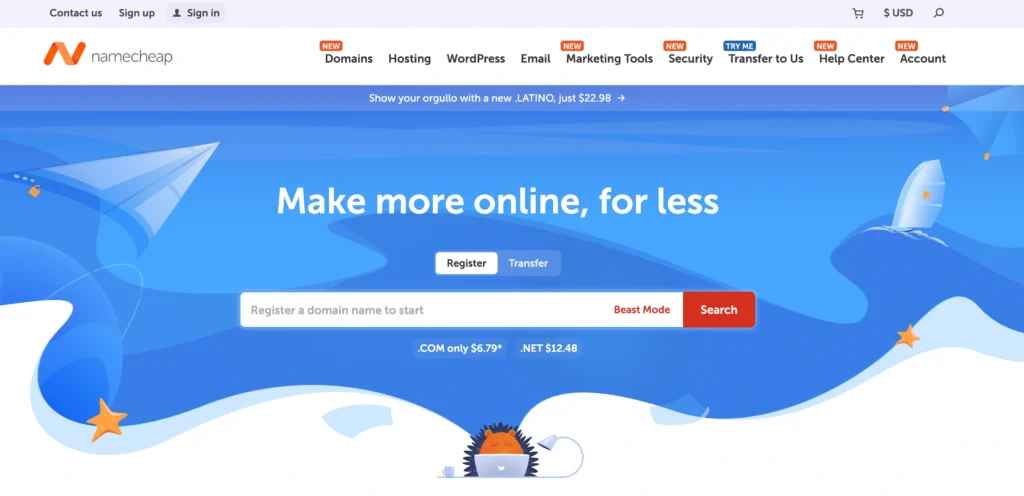
Namecheap started in 2000 as a domain name company and later expanded into hosting, business email, SSL, website security, WordPress hosting, VPS, and dedicated servers. Today, it is one of the most recognized names in the domain and hosting space.
The biggest reason people choose Namecheap is value. You can register a domain, buy hosting, create email accounts, install WordPress, add SSL, and manage DNS from one dashboard. For beginners, that makes the setup process much easier.
Namecheap currently offers several hosting types:
• Shared Hosting
• EasyWP Managed WordPress Hosting
• VPS Hosting
• Reseller Hosting
• Dedicated Server Hosting
• Private Email Hosting
For most readers, the shared hosting plans and EasyWP plans will be the most relevant.
Namecheap Hosting Pricing 2026
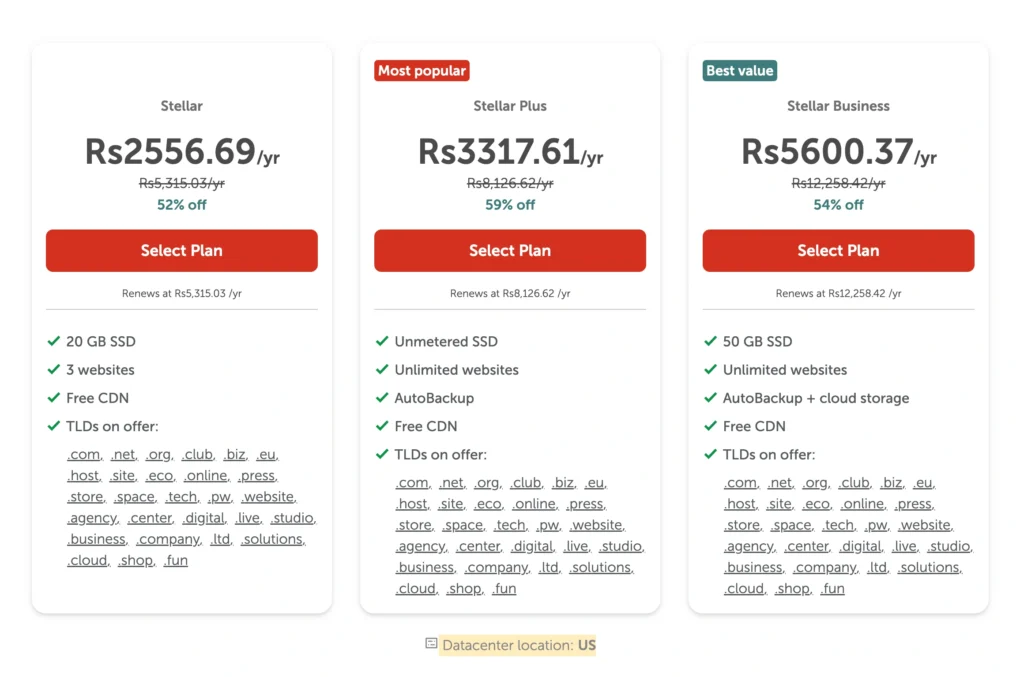
Namecheap pricing is one of its strongest points. The entry level shared hosting plans are cheaper than many popular web hosts, especially for users who want to host more than one website.
Prices below are based on Namecheap’s public pricing at the time of writing. Hosting companies change discounts often, so always check the final checkout page before buying.
Namecheap Shared Hosting Pricing
| Plan | Starting Price | Regular Price | Websites | Storage | Bandwidth | Best For |
|---|---|---|---|---|---|---|
| Stellar | $2.28/mo | $5.88/mo | 3 websites | 20 GB SSD | Unmetered | Beginners and small websites |
| Stellar Plus | $2.98/mo | $7.88/mo | Unlimited | Unmetered SSD | Unmetered | Bloggers and growing sites |
| Stellar Business | $4.98/mo | $11.88/mo | Unlimited | 50 GB SSD | Unmetered | Business sites and ecommerce starters |
Namecheap EasyWP WordPress Hosting Pricing
EasyWP is Namecheap’s managed WordPress hosting product. It is built for users who want WordPress hosting without managing cPanel.
| Plan | First Month Price | Renewal Price | Websites | Monthly Visits | Storage | Uptime Guarantee |
|---|---|---|---|---|---|---|
| EasyWP Starter | $0.00/mo first month | $9.88/mo | 1 | 50K | 10 GB NVMe | 99.9 percent |
| EasyWP Turbo | $13.88/mo first month | $18.88/mo | 1 | 200K | 50 GB NVMe | 99.9 percent |
| EasyWP Supersonic | $20.88/mo first month | $26.88/mo | 1 | 500K | 100 GB NVMe | 99.99 percent |
Namecheap VPS Hosting Pricing
Namecheap VPS hosting is made for users who need more control, root access, and dedicated resources compared with shared hosting.
| VPS Plan | Starting Price | Regular Price | CPU | RAM | Storage | Bandwidth |
|---|---|---|---|---|---|---|
| Spark | $3.88/mo | $4.88/mo | 1 core | 1 GB | 20 GB SSD RAID 10 | 1000 GB |
| Pulsar | $6.88/mo | $8.88/mo | 2 cores | 2 GB | 40 GB SSD RAID 10 | 1000 GB |
| Quasar | $12.88/mo | $15.88/mo | 4 cores | 6 GB | 120 GB SSD RAID 10 | 3000 GB |
| Magnetar | $24.88/mo | $28.88/mo | 8 cores | 12 GB | 240 GB SSD RAID 10 | 6000 GB |
| Hypernova | $46.88/mo | $52.88/mo | 12 cores | 24 GB | 500 GB SSD RAID 10 | 10000 GB |
Namecheap Reseller Hosting Pricing
Reseller hosting is useful for freelancers, small agencies, and web designers who want to sell hosting to clients.
| Plan | Price | cPanel Accounts | Storage | Best For |
|---|---|---|---|---|
| Nebula | $19.88/mo | 25 | 30 GB SSD | Small client hosting |
| Galaxy Expert | $39.88/mo | 100 | 90 GB SSD | Growing agencies |
| Universe Pro | $58.88/mo | 150 | 150 GB SSD | Larger reseller setups |
Namecheap Dedicated Server Pricing
Dedicated servers are for advanced users, SaaS projects, large sites, resource heavy apps, and businesses that need full server control.
| Server | Starting Price | CPU | RAM | Storage | Bandwidth |
|---|---|---|---|---|---|
| Xeon E3 1230 v5 | $37.66/mo | 4 cores at 3.4 GHz | 8 GB DDR4 | 480 GB SSD | 100 TB/mo |
| Xeon E 2234 | $41.53/mo | 4 cores at 3.4 GHz | 16 GB DDR4 | 480 GB SSD | 100 TB/mo |
| Xeon E 2136 | $56.52/mo | 6 cores at 3.3 GHz | 32 GB DDR4 | 2 x 480 GB SSD | 100 TB/mo |
| Xeon E 2236 | $58.79/mo | 6 cores at 3.3 GHz | 64 GB DDR4 | 2 x 960 GB SSD | 100 TB/mo |
Namecheap Hosting Features
1. cPanel Hosting
Namecheap shared hosting uses cPanel, which is still one of the easiest hosting control panels for beginners. From cPanel, you can manage files, emails, databases, domains, subdomains, SSL, backups, and WordPress installs.
This is useful because many cheap hosting companies now use custom dashboards that may look simple but often limit control. Namecheap gives users the familiar setup most webmasters already understand.
2. WordPress Support
Namecheap shared hosting includes Softaculous, which lets you install WordPress quickly. You can also install other apps like Joomla, Drupal, Magento, and more.
For users who only want WordPress, EasyWP is the cleaner option. It removes cPanel from the experience and gives you a more focused WordPress dashboard with backups, caching, migration tools, and managed WordPress features.
3. Free Website Migration
Namecheap offers website migration support, which is helpful if you are moving from another host. This is a strong feature for beginners because migration can be stressful if you do not know how to move files, databases, and email records manually.
4. Free SSL Certificates
SSL is now basic for every website. It protects visitors, helps browsers mark your site as secure, and is important for trust. Namecheap includes SSL support with hosting plans, although the exact SSL terms can depend on the hosting product and checkout offer.
5. Email Hosting Included
All Namecheap shared hosting plans include email accounts. Stellar includes 30 email accounts, while Stellar Plus and Stellar Business include unlimited email accounts. This is useful for small businesses that want branded emails like contact@yourdomain.com without paying extra for a separate email provider.
6. Backups
Namecheap includes backup options, but the level depends on the plan. Stellar includes twice weekly backups, while Stellar Plus and Stellar Business include the AutoBackup tool with daily, weekly, and monthly backup access.
This is one reason Stellar Plus is often the better pick than the cheapest Stellar plan. If you are serious about your website, easier backups are worth the small extra cost.
7. Cloud Storage On Selected Plans
Namecheap includes Cloud Storage on Stellar Business plans with the US datacenter and all Stellar shared hosting plans with EU and Singapore datacenters. This is designed to improve stability and reduce downtime risks.
8. Security Tools
Namecheap shared hosting includes security features like firewalls, SSL, spam protection, cPanel two factor authentication, and Imunify360 on supported plans. Stellar Business also includes stronger security benefits, making it more suitable for business sites than the base plan.
9. Developer Friendly Features
Namecheap is not just for beginners. Shared hosting supports PHP versions, MySQL, PostgreSQL, Perl, Python, Node.js, Ruby, MariaDB, and jailed SSH access. This makes it useful for developers who want cheap hosting for testing, small projects, and lightweight apps.
10. 30 Day Money Back Guarantee
Namecheap offers a 30 day money back guarantee on shared hosting for eligible first time customers. This gives new users enough time to test the dashboard, install WordPress, check support, and decide if the hosting is right for them.
Namecheap Performance and Uptime
Namecheap markets strong uptime for its hosting plans. Shared hosting pages mention 100 percent uptime, while EasyWP plans include uptime guarantees of 99.9 percent or 99.99 percent depending on the plan. VPS plans list 99.9 percent uptime, and dedicated servers list 99.99 percent uptime.
In real use, performance depends on your plan, website size, theme, plugins, images, server location, and caching. A small WordPress blog on Stellar Plus can perform well if optimized properly. A heavy WooCommerce store with many plugins may need VPS, cloud hosting, or managed WordPress hosting from a more performance focused provider.
For best results on Namecheap, use lightweight themes, compress images, enable caching, avoid too many plugins, and choose the datacenter closest to your main audience.
Namecheap Ease of Use
Namecheap is beginner friendly, especially if you already buy domains there. You can manage domains, hosting, SSL, DNS, email, and renewals from one account.
The shared hosting experience is traditional cPanel hosting. That means it may look slightly technical at first, but it gives you more control than many simplified hosting dashboards. EasyWP is easier for pure WordPress users because it removes many server level settings and focuses only on the WordPress site.
Beginners who want a simple blog or affiliate website should be fine with Stellar Plus or EasyWP Starter.
Namecheap Customer Support
Namecheap support is available through 24/7 live chat and email ticket support. There is no phone support at this time. For many users, live chat is enough, but business owners who prefer direct phone help may find this limiting.
The help center is also useful. Namecheap has many guides on domains, DNS, SSL, hosting, email, WordPress, and account management.
Namecheap Pros and Cons
Pros
• Very affordable starting prices
• cPanel included with shared hosting
• Host up to 3 websites even on the base Stellar plan
• Stellar Plus and Business allow unlimited websites
• Free website migration available
• Email hosting included
• Good option for domain and hosting in one account
• EasyWP is simple for WordPress users
• VPS and dedicated plans are available for scaling
• 30 day money back guarantee on eligible shared hosting purchases
Cons
• Renewal prices are higher than intro prices
• No phone support
• Cheapest plan has limited storage
• Base shared plan does not include the same backup convenience as higher plans
• EasyWP is only for WordPress
• VPS and dedicated plans require more technical knowledge
• Not the best fit for very large WooCommerce stores or high traffic business websites
Namecheap vs Similar Hosting Providers
| Hosting Provider | Starting Shared Hosting Price | Best For | Free Domain | Control Panel | Main Strength |
|---|---|---|---|---|---|
| Namecheap | $2.28/mo | Budget websites and domain users | On selected terms | cPanel | Low cost hosting with solid basics |
| DreamHost | $2.89/mo | WordPress beginners | Yes on selected plans | Custom panel | Strong money back policy |
| SiteGround | $2.99/mo | Small business WordPress sites | Often included on promo terms | Site Tools | Speed and support |
| Hostinger | $3.49/mo | Beginners and value seekers | Yes on selected plans | hPanel | Easy dashboard and strong features |
| Bluehost | $4.99/mo | WordPress beginners | Yes on selected plans | Custom plus cPanel tools | Beginner friendly WordPress setup |
| GoDaddy | $6.99/mo | Domain users who want bundled tools | Often included | Custom panel | Huge brand and domain ecosystem |
Namecheap stands out because of price. It is one of the cheapest ways to host multiple small websites without moving away from cPanel. Hostinger is easier for users who like a modern dashboard. SiteGround is stronger for performance and support. Bluehost is simple for WordPress beginners. DreamHost is good for users who want clear renewal pricing and a longer refund window.
Which Namecheap Plan Should You Choose?
Choose Stellar If
You are starting a small website, personal blog, portfolio, or basic business page. It is cheap and supports up to 3 websites, which is generous for a starter plan.
Choose Stellar Plus If
You want better value for multiple websites. Stellar Plus gives you unlimited hosted websites, unmetered SSD storage, unmetered bandwidth, and better backup access. For most bloggers and affiliate site owners, this is the best shared hosting plan.
Choose Stellar Business If
You run a business website, starter ecommerce site, or a website where stability matters more. The 50 GB SSD storage, Cloud Storage support in more regions, higher limits, and stronger security make it the best shared plan.
Choose EasyWP Starter If
You only want to run one WordPress website and do not want to manage cPanel. This is good for simple blogs, personal brands, and small WordPress sites.
Choose VPS If
You need root access, more server control, dedicated resources, and better scaling. VPS is not ideal for total beginners unless you choose management add ons or have technical support.
Choose Dedicated Servers If
You need a full physical server for high traffic websites, apps, SaaS platforms, databases, or reseller environments. This is for advanced users and businesses with technical needs.
Is Namecheap Good for WordPress?
Yes, Namecheap is good for WordPress if your site is small to medium sized. Shared hosting works well for basic WordPress sites, blogs, and affiliate websites. EasyWP is better if you want a cleaner managed WordPress setup.
However, if you run a heavy WooCommerce store, online course website, membership site, or high traffic publication, you may eventually need a stronger managed WordPress host or VPS.
Is Namecheap Good for Ecommerce?
Namecheap can work for small ecommerce websites, especially on Stellar Business or VPS. You get SSL, email, databases, unmetered bandwidth, and WordPress support. However, serious ecommerce stores should be careful with cheap shared hosting because checkout speed, uptime, backups, and security matter a lot.
For a small store, Namecheap is fine. For a revenue heavy store, consider a stronger hosting setup.
Is Namecheap Safe?
Namecheap includes important security basics such as SSL support, firewalls, spam protection, cPanel two factor authentication, and malware protection features on selected plans. It is safe enough for normal websites when you also follow good security practices.
You should still use strong passwords, keep WordPress updated, update plugins, install security plugins, enable backups, and avoid unknown themes or nulled plugins.
Final Verdict: Is Namecheap Hosting Worth It?
Namecheap Hosting is worth it for beginners, bloggers, affiliate marketers, small businesses, and anyone who wants affordable hosting with practical features. The pricing is low, the feature list is strong, cPanel is included, email hosting is available, and the plans are flexible enough to start small and upgrade later.
The best overall shared plan is Stellar Plus because it gives unlimited websites, unmetered SSD storage, unmetered bandwidth, and better backup access at a low price. For business websites, Stellar Business is the safer pick. For WordPress only users, EasyWP Starter is simple and clean.
Namecheap is not perfect. Renewal prices are higher, there is no phone support, and performance focused users may eventually need a stronger provider. Still, for the price, Namecheap remains one of the most practical budget hosting choices in 2026.