
Cloudways is one of the most popular names in managed cloud hosting, especially for WordPress users, ecommerce stores, agencies, developers, and growing blogs that need better speed than basic shared hosting.
It is not a normal hosting company where you buy a fixed shared plan and stay locked inside one server setup. Cloudways works as a managed layer on top of cloud providers like DigitalOcean, Vultr, Linode, AWS, and Google Cloud.
That means you get the power of cloud hosting without handling server setup, security patches, command line work, caching configuration, backups, PHP settings, and day to day server maintenance yourself. This is the main reason Cloudways has become a strong middle option between cheap shared hosting and expensive premium managed WordPress hosting.
In this Cloudways review, we will cover pricing, features, performance, support, pros and cons, who should use it, who should avoid it, and how it compares with similar hosting providers like Kinsta, WP Engine, SiteGround, Hostinger, and Bluehost.
What Is Cloudways?
Cloudways is a managed cloud hosting platform. Instead of owning all the infrastructure itself, Cloudways lets you choose a cloud provider and then gives you a clean dashboard to manage your server, application, backups, SSL, staging, caching, scaling, and team access.
You can launch WordPress, WooCommerce, Magento, Laravel, PHP apps, and other supported applications. The most common use case is WordPress hosting, but Cloudways is also useful for agencies that manage many client sites on one or more cloud servers.
The biggest advantage is control. You choose your cloud provider, server size, data center, application, and resource level. If your site grows, you can scale your server. If you run multiple websites, you can host multiple applications on the same server, depending on available resources.
Cloudways Quick Review
| Cloudways Review Factor | Details |
|---|---|
| Best for | WordPress sites, agencies, ecommerce stores, growing blogs, developers |
| Starting price | $11 per month on DigitalOcean Standard |
| Hosting type | Managed cloud hosting |
| Cloud providers | DigitalOcean, Vultr, Linode, AWS, Google Cloud |
| Free trial | Available on selected providers, no credit card required |
| Free SSL | Yes |
| Free migration | Yes, one free managed migration |
| Backups | Automated backups available, offsite backup storage is charged separately |
| Email hosting | Not included by default, Rackspace Email add on available |
| Domain registration | Not included |
| Support | 24 by 7 by 365 support |
| Best value plan | DigitalOcean 2GB or Vultr 2GB for most starter business sites |
Cloudways Pricing in 2026
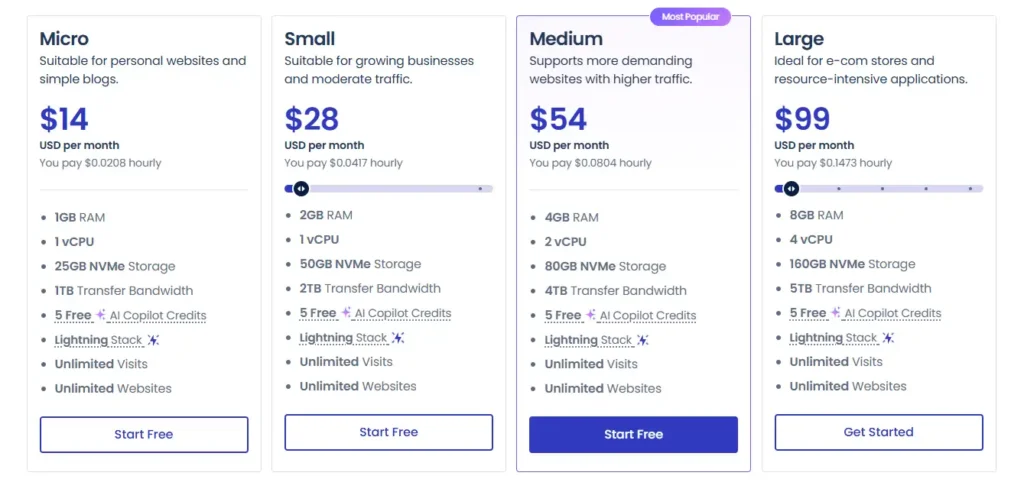
Cloudways pricing depends on the cloud provider and server size you choose. This makes pricing more flexible than traditional managed WordPress hosting. You can start small and upgrade later as traffic grows.
Cloudways Flexible Pricing Table
| Cloud Provider | Entry Plan | RAM | CPU | Storage | Bandwidth | Monthly Price |
|---|---|---|---|---|---|---|
| DigitalOcean Standard | DO 1GB | 1 GB | 1 Core | 25 GB | 1 TB | $11 per month |
| DigitalOcean Standard | DO 2GB | 2 GB | 1 Core | 50 GB | 2 TB | $24 per month |
| DigitalOcean Standard | DO 4GB | 4 GB | 2 Core | 80 GB | 4 TB | $46 per month |
| DigitalOcean Premium | DO 1GB | 1 GB | 1 Core | 25 GB | 1 TB | $14 per month |
| DigitalOcean Premium | DO 2GB | 2 GB | 1 Core | 50 GB | 2 TB | $28 per month |
| DigitalOcean Premium | DO 4GB | 4 GB | 2 Core | 80 GB | 4 TB | $54 per month |
| Vultr Standard | Vultr 1GB | 1 GB | 1 Core | 25 GB | 1 TB | $14 per month |
| Vultr Standard | Vultr 2GB | 2 GB | 1 Core | 55 GB | 2 TB | $28 per month |
| Vultr Standard | Vultr 4GB | 4 GB | 2 Core | 80 GB | 3 TB | $54 per month |
| Vultr High Frequency | Vultr 1GB | 1 GB | 1 Core | 32 GB | 1 TB | $16 per month |
| Vultr High Frequency | Vultr 2GB | 2 GB | 1 Core | 64 GB | 2 TB | $30 per month |
| Linode | Linode 1GB | 1 GB | 1 Core | 25 GB | 1 TB | $14 per month |
| Linode | Linode 2GB | 2 GB | 1 Core | 50 GB | 2 TB | $28 per month |
| AWS | Small | 2 GB | 2 vCPU | 20 GB | Pay as you go | $38.56 per month |
| Google Cloud | Small | 1.75 GB | 1 vCPU | 20 GB | Pay as you go | $37.45 per month |
Cloudways Autonomous Pricing
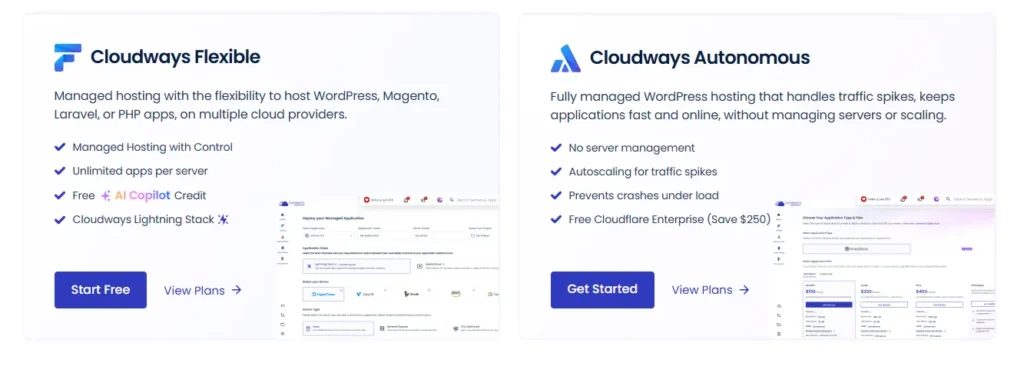
Cloudways also offers Cloudways Autonomous, which is built for high traffic WordPress websites that need autoscaling. This is different from Cloudways Flexible because it is made for sites that need to handle traffic spikes without manual server scaling.
| Plan | Monthly Price | Websites | Bandwidth | Disk Space | Best For |
|---|---|---|---|---|---|
| Growth | $100 per month | 1 | 150 GB | 20 GB | Growing business sites |
| Scale | $200 per month | 1 | 250 GB | 50 GB | WooCommerce stores |
| Plus | $400 per month | 1 | 1000 GB | 100 GB | LMS and large ecommerce sites |
| Enterprise | Custom | Custom | Custom | Custom | Large businesses |
For most bloggers, affiliate sites, small business websites, and agency client sites, Cloudways Flexible is the better value. Autonomous makes more sense if your site gets sudden traffic spikes, flash sale traffic, course launch traffic, or high checkout activity.
What Is Included in Cloudways Plans?
Cloudways includes many features that would normally need plugins, developer setup, or paid tools if you were managing a raw cloud server yourself.
| Feature | Included With Cloudways |
|---|---|
| Managed cloud server | Yes |
| Free SSL | Yes |
| Free migration | Yes |
| Unlimited application installs | Yes, based on server capacity |
| Automated backups | Yes |
| Staging environment | Yes |
| Server monitoring | Yes |
| Dedicated firewall | Yes |
| PHP version control | Yes |
| SSH and SFTP access | Yes |
| Team management | Yes |
| Object Cache Pro | Included on eligible plans |
| Advanced caching | Yes |
| Auto healing servers | Yes |
| Regular security patching | Yes |
| Cloudflare Enterprise | Paid add on for Flexible plans |
| Email inboxes | Paid add on |
| Domain name | Not included |
Cloudways Features Review
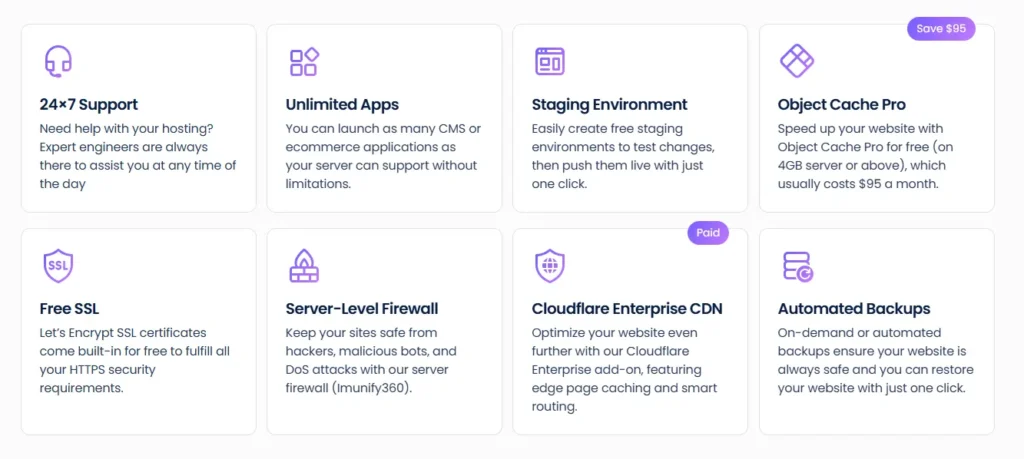
1. Managed Cloud Hosting Without Server Headache
Cloud hosting is powerful, but it can be confusing for non technical users. If you buy directly from DigitalOcean, Vultr, AWS, or Google Cloud, you usually need to configure the server yourself. That means setting up the stack, security, database, PHP, caching, backups, SSL, and monitoring.
Cloudways removes most of that work. You still get control, but you do not have to manage every technical setting from scratch. This is useful for website owners who want cloud level performance without hiring a server admin.
2. Multiple Cloud Providers
Cloudways lets you choose from DigitalOcean, Vultr, Linode, AWS, and Google Cloud. This is one of its strongest selling points because you are not stuck with one infrastructure provider.
DigitalOcean is usually the best value for most users. Vultr High Frequency can be good for speed focused websites. Linode is solid for balanced performance. AWS and Google Cloud are better for businesses that want enterprise grade cloud infrastructure, although they cost more.
3. Strong WordPress Performance
Cloudways is popular among WordPress users because it uses an optimized stack with NGINX, Apache, PHP FPM, MariaDB, Varnish, Redis, Memcached, and other performance tools. You do not need to manually configure every layer.
For WordPress websites, Cloudways also offers the Breeze caching plugin. This helps with page caching, file optimization, database cleanup, and CDN integration. You can also use other popular WordPress optimization plugins if you prefer.
4. Free SSL Certificates
Cloudways includes free SSL through Let’s Encrypt. You can install SSL from the dashboard without dealing with manual certificate files. This is useful for blogs, business websites, ecommerce stores, and client projects.
SSL is now basic for every serious website. It protects data, helps trust, and avoids browser security warnings.
5. Staging Environment
Cloudways includes staging, which is very useful if you update WordPress themes, plugins, custom code, or WooCommerce features. You can test changes on a staging copy before pushing them live.
This reduces the risk of breaking the live website. Agencies and developers will find this especially useful when handling client updates.
6. Automated Backups
Cloudways lets you schedule automated backups and restore your website when needed. This is important because plugin conflicts, bad updates, malware, and human mistakes can happen at any time.
One thing to remember is that offsite backup storage is charged separately. The cost is small for most sites, but it is still something to include when calculating total monthly cost.
7. Vertical Scaling
If your website needs more power, Cloudways lets you scale server resources from the dashboard. This is much easier than migrating your website to a different host.
For example, you can start with a 1GB or 2GB server and move to 4GB or 8GB when your site grows. Ecommerce stores, LMS websites, and large blogs should plan for scaling because traffic and database usage can increase over time.
8. Team Management
Cloudways allows you to add team members and control access. This is useful for agencies, developers, SEO teams, writers, and business owners who do not want to share one master login with everyone.
You can give specific access to servers, applications, billing, or support depending on the role.
9. Security Features
Cloudways includes dedicated firewalls, regular security patching, SSL, bot protection options, two factor authentication, application isolation, and server monitoring.
It is not a replacement for good WordPress security habits, but it gives a stronger base than cheap shared hosting. You should still use strong passwords, keep plugins updated, avoid nulled themes, and limit admin access.
10. Cloudways Add Ons
Cloudways has optional add ons for users who need extra features.
| Add On | Starting Price | Use Case |
|---|---|---|
| Cloudflare Enterprise | From $4.99 per domain per month | Better CDN, edge caching, security, global performance |
| Rackspace Email | $1 per mailbox per month | Business email inboxes |
| DNS Made Easy | $0.50 per domain per month | Faster DNS management |
| Malware Protection | From $4 per app per month | Malware scanning and removal |
| Site Manager | From $3 per app per month | WordPress site management |
| Advanced Support | Paid add on | Deeper technical support |
The add ons are useful, but they can increase your total bill. Before buying, check what your website actually needs.
Cloudways Performance Review
Cloudways can perform much better than basic shared hosting because your site gets cloud server resources instead of sitting on a crowded shared server. Performance will depend on your selected provider, server size, website setup, theme, plugins, caching, image optimization, and traffic level.
A clean WordPress website on a 2GB DigitalOcean or Vultr server can run very well for small to medium traffic. For WooCommerce, membership sites, LMS sites, and websites with logged in users, you may need more RAM and better caching.
The main performance advantage is that Cloudways gives you server level caching and cloud resources without forcing you into a fully locked managed WordPress setup.
Cloudways Ease of Use
Cloudways is easier than using raw cloud hosting, but it is not as beginner friendly as Bluehost or Hostinger shared hosting. There is still a small learning curve.
You need to understand things like server size, bandwidth, application setup, DNS, SSL, staging, backups, and caching. The dashboard is clean, but total beginners may need some time to get comfortable.
For anyone who has used WordPress before, Cloudways is not hard. For agencies, affiliate site owners, ecommerce teams, and developers, it feels practical and flexible.
Cloudways Support Review
Cloudways offers 24 by 7 by 365 support through live chat and tickets. The standard support is enough for most hosting related issues such as server access, SSL, backups, migration, and dashboard settings.
For deeper troubleshooting related to plugins, themes, performance tuning, and application level issues, Cloudways has paid advanced support options. This is important to understand because no hosting provider will fix every theme or plugin problem for free.
Support is good for managed cloud hosting, but users should not expect a full developer service included at the lowest price.
Cloudways Pros and Cons
Pros
• Flexible cloud provider choices
• Starts at $11 per month
• Strong value for WordPress and WooCommerce sites
• Better performance potential than shared hosting
• Free SSL included
• Free migration included
• Staging environment included
• Automated backups available
• Unlimited applications based on server capacity
• Easy server scaling
• Good for agencies and multiple websites
• No strict visit limits on Flexible plans
Cons
• Domain registration is not included
• Email hosting is not included by default
• Offsite backups cost extra
• Some add ons increase the monthly bill
• Not as simple as beginner shared hosting
• AWS and Google Cloud plans are more expensive
• Advanced support costs extra
• No traditional cPanel
Cloudways vs Similar Hosting Providers
| Hosting Provider | Starting Price | Hosting Type | Best For | Main Difference |
|---|---|---|---|---|
| Cloudways | $11 per month | Managed cloud hosting | Growing sites, agencies, ecommerce | Flexible cloud hosting with multiple providers |
| Kinsta | $35 per month | Premium managed WordPress | Business WordPress sites | More polished WordPress only hosting |
| WP Engine | $30 per month | Managed WordPress | Agencies and business sites | Strong WordPress tools and developer features |
| SiteGround | $4.99 per month promo | Shared and cloud hosting | Small business websites | Easy shared hosting with higher renewal prices |
| Hostinger | $2.99 per month promo | Shared, cloud, VPS | Beginners and budget users | Very affordable long term hosting |
| Bluehost | Around $1.99 to $3.99 promo | Shared, VPS, cloud | Beginners and WordPress starters | Simple setup and beginner friendly dashboard |
Cloudways vs Kinsta
Cloudways gives you more control and usually better pricing for multiple websites. Kinsta is more polished for WordPress only hosting and offers a premium managed experience.
Choose Cloudways if you want flexible cloud hosting, multiple apps, server control, and better value for agencies. Choose Kinsta if you want premium WordPress hosting with less server decision making.
Cloudways vs WP Engine
WP Engine is a strong managed WordPress host with excellent developer tools and support for WordPress teams. Cloudways is more flexible because it supports multiple cloud providers and does not follow strict WordPress visit based pricing on Flexible plans.
Choose Cloudways if you want cloud flexibility and better cost control. Choose WP Engine if your business is fully WordPress focused and you prefer a more managed environment.
Cloudways vs SiteGround
SiteGround is easier for beginners and starts at a lower promotional price. But Cloudways gives more server control and better scaling options.
Choose SiteGround for a simple small business website. Choose Cloudways when performance, scaling, and cloud resources matter more.
Cloudways vs Hostinger
Hostinger is cheaper and easier for new users. It is a good option for small blogs, portfolio sites, and beginner projects. Cloudways is better for users who want stronger cloud hosting and more control.
Choose Hostinger if your main goal is low cost. Choose Cloudways if your website is already getting traffic or you want better performance headroom.
Who Should Use Cloudways?
Cloudways is a good choice for:
• Affiliate websites with growing traffic
• WordPress blogs that outgrew shared hosting
• WooCommerce stores
• Agencies managing client websites
• Developers who want managed cloud hosting
• LMS and membership websites
• Business websites that need speed and uptime
• Users who want DigitalOcean, Vultr, Linode, AWS, or Google Cloud without server management
Who Should Avoid Cloudways?
Cloudways may not be the best choice for:
• Absolute beginners who want the simplest hosting setup
• Users who need free email hosting included
• People who want domain registration and hosting in one place
• Very small websites with almost no traffic
• Users who prefer cPanel hosting
• Anyone who wants the cheapest possible hosting plan
If your site is brand new and budget is tight, Hostinger, Bluehost, or SiteGround may feel easier. If your site earns money or handles serious traffic, Cloudways becomes more attractive.
Best Cloudways Plan to Choose
For most users, the DigitalOcean 2GB plan at $24 per month is a practical starting point. It gives better breathing room than the 1GB server and can handle a serious WordPress site if optimized properly.
For better speed, Vultr High Frequency 2GB at $30 per month is also a strong option. For agencies, a 4GB server is often a better choice because it can host multiple small to medium client sites, depending on traffic and plugin load.
For WooCommerce, do not start too small. A 2GB server can work for a small store, but a 4GB server is safer if the store has many plugins, traffic, product filters, or logged in users.
Is Cloudways Good for WordPress?
Yes, Cloudways is very good for WordPress, especially if you want more power than shared hosting but do not want to manage a server yourself. It supports WordPress installation, caching, SSL, staging, backups, PHP settings, Redis, Object Cache Pro on eligible plans, and server monitoring.
The only thing to remember is that Cloudways is not WordPress only. That can be a good thing if you also run PHP apps, Laravel apps, or multiple projects.
Is Cloudways Good for WooCommerce?
Cloudways can be a strong choice for WooCommerce because ecommerce stores need better resources than normal blogs. Product pages, carts, checkout pages, customer accounts, and admin activity can put more load on the server.
For WooCommerce, use at least a 2GB plan for a small store and consider 4GB or higher for a serious store. Also use good caching rules, optimize images, reduce heavy plugins, and consider Cloudflare Enterprise if your store gets traffic from different countries.
Is Cloudways Worth It?
Cloudways is worth it if you want managed cloud hosting with better control, scalable resources, strong WordPress performance, and fair pricing. It is not the cheapest host, but it gives much better flexibility than basic shared hosting.
The main value is simple: you get cloud hosting power without doing all the server work yourself.
For a beginner hobby blog, Cloudways may be more than you need. For an affiliate site, ecommerce store, agency website, client project, or serious WordPress business, Cloudways is one of the best value managed cloud hosting platforms in 2026.
Final Verdict
Cloudways is a strong hosting choice for users who have moved beyond basic shared hosting and want faster, more scalable, and more flexible cloud hosting. The platform gives you a good balance of performance, control, pricing, and managed support.
The pricing starts at $11 per month, which makes it accessible, but the real sweet spot is usually the 2GB or 4GB plans. You should also remember extra costs like backups, email, Cloudflare Enterprise, malware protection, or advanced support if you need them.
Overall, Cloudways is best for website owners who care about performance and want room to grow. It is especially useful for WordPress users, agencies, affiliate marketers, WooCommerce stores, and small businesses that want reliable cloud hosting without server management headaches.