
Choosing between A2 Hosting vs SiteGround is frustrating because both sound fast, both market themselves hard to WordPress users, and both look affordable until you check renewal pricing.
I have used both on real projects. Small blogs. Affiliate sites. WooCommerce stores. Staging sites for clients. My simple take is this:
Quick Winner: SiteGround wins for most beginners and business owners in 2026, while A2 Hosting is better if you want cPanel, LiteSpeed, and more control at a lower long-term entry point.
That is the short answer.
The longer answer depends on your budget, traffic, technical comfort, and how much you care about renewal pricing.
If you are starting a simple niche blog, A2 Hosting is tempting. If you want a cleaner WordPress experience with better hand-holding, SiteGround feels more polished. But neither is perfect. Both use attractive first-year pricing. Both get expensive later. And both have features that look better on the sales page than they feel in daily use.
This A2 Hosting vs SiteGround comparison breaks it down without sugarcoating it.
A2 Hosting vs SiteGround Quick Comparison Table
| Feature | A2 Hosting | SiteGround |
|---|---|---|
| Starting Price | Around $2.99 to $3.99/mo depending on promo | Around $2.99/mo promo on StartUp |
| Renewal Price | Higher after intro term | Much higher after intro term |
| Server Technology | LiteSpeed, NVMe SSD, AMD EPYC on newer hosting.com plans | Google Cloud, custom PHP, NGINX caching, SiteGround CDN |
| Control Panel | cPanel style setup and hosting.com dashboard | Custom Site Tools dashboard |
| Free Domain | Available on select annual plans | Free domain for the first year on current offers |
| Free SSL | Yes | Yes |
| Backups | Daily backups on newer plans | Daily backups with restore points |
| Best For | Developers, cPanel users, budget performance seekers | Beginners, WordPress users, small business sites |
| Uptime Claim | 99.9 percent SLA | Strong uptime reputation and managed platform |
| Ease of Use | Good, but less beginner friendly | Very beginner friendly |
| Main Weakness | Branding transition and support consistency | Renewal pricing |
A2 Hosting vs SiteGround: A2 Hosting Deep Dive

A2 Hosting has always had one big selling point: speed.
For years, the brand pushed Turbo Servers, LiteSpeed, caching, and developer-friendly hosting. In 2026, the situation is a little different because A2 Hosting has moved under the hosting.com brand in many places. Still, users search for A2 Hosting, and the core appeal remains the same.
You get fast server technology, cPanel familiarity, NVMe storage, free SSL, email, backups, and support for WordPress, PHP, Node.js, Python, and other developer tools.
Why A2 Hosting Is Popular
A2 Hosting became popular because it did not feel like a beginner-only host.
You could run a WordPress blog, but you could also do more technical work. You had cPanel. You had SSH. You had WP-CLI. You had multiple PHP versions. You had performance options that actually mattered.
The newer hosting.com plans are more transparent than old “unlimited everything” hosting. You can see resources like RAM, vCPU, IOPS, and storage. I like that. Shared hosting is always limited, so I would rather see the limits upfront than discover them when traffic spikes.
Key A2 Hosting Features

- LiteSpeed Web Server
- NVMe storage
- Free SSL
- Daily backups on newer plans
- cPanel access
- WordPress tools
- Free migration
- Email hosting
- Malware and DDoS protection
- Developer support for SSH, WP-CLI, Python, and Node.js
A2 Hosting Pros
- Good speed potential, especially with LiteSpeed caching
- cPanel is familiar for users moving from older hosts
- Better for developers than many beginner hosting brands
- Transparent resource limits on newer plans
- Free migration helps if you are moving from another cPanel host
- Good value on mid-tier plans when discounts are active
A2 Hosting Cons
- Branding can feel confusing because A2 Hosting is now tied closely to hosting.com
- Not as polished for beginners as SiteGround
- Support quality can vary
- Renewals are still a trap if you only look at promo pricing
- Entry plans may be too limited for serious WooCommerce
Who Should Buy A2 Hosting?
Choose A2 Hosting if you want affordable performance and you are not scared of hosting settings.
It is a good fit for:
- Bloggers who want speed on a budget
- Developers who prefer cPanel
- Affiliate site owners with multiple small sites
- Users moving from another cPanel host
- People who want LiteSpeed without paying premium managed WordPress pricing
I would not put a high-revenue WooCommerce store on the cheapest A2 plan. For that, you need stronger resources or VPS/cloud hosting.
A2 Hosting vs SiteGround: SiteGround Deep Dive

SiteGround feels more refined.
It is not the cheapest host. It is not the most developer-heavy host. But it does a lot of things well for people who want reliable WordPress hosting without managing too much technical work.
SiteGround uses its own Site Tools dashboard instead of cPanel. Some old-school users hate that. Beginners usually like it. It is clean, fast, and easier to understand than traditional cPanel.
SiteGround’s Unique Selling Point
SiteGround’s biggest strength is balance.
You get strong WordPress tools, daily backups, free SSL, CDN, email, staging on higher plans, caching, and a support team that is usually better than budget hosting support.
The platform is built around Google Cloud infrastructure, custom PHP, caching, and its own optimization tools. That means SiteGround controls more of the stack. In daily use, that often makes setup easier.
Key SiteGround Features

- Managed WordPress hosting
- Free SSL
- Free CDN
- Daily backups
- Free email
- Site Tools dashboard
- WordPress migration plugin
- Staging on GrowBig and GoGeek
- On-demand backups on higher plans
- Custom caching
- Google Cloud infrastructure
- Priority support on GoGeek
SiteGround Pros
- Very easy for beginners
- Excellent WordPress setup flow
- Daily backups included
- Good support experience
- Strong security stack
- Staging is useful on GrowBig and GoGeek
- Better dashboard than cPanel for non-technical users
SiteGround Cons
- Renewal pricing is painful
- Storage limits are not generous
- StartUp plan is only for one site
- No cPanel
- Advanced users may feel boxed in
- GoGeek gets expensive fast
Who Should Buy SiteGround?
Choose SiteGround if you want less headache.
It is a good fit for:
- Beginners starting a WordPress site
- Small business owners
- Coaches, consultants, and local businesses
- Bloggers who want managed features
- WooCommerce users who can afford GrowBig or GoGeek
- Users who value support more than the lowest price
If you are writing your first SiteGround review, the honest angle is simple: SiteGround is good, but it is not cheap after renewal.
A2 Hosting vs SiteGround Performance: Speed, TTFB, Uptime, and Server Tech
This is where the A2 Hosting vs SiteGround speed test discussion gets interesting.
A2 Hosting leans on LiteSpeed. SiteGround leans on Google Cloud, custom PHP, NGINX delivery, caching, and CDN.
Both can be fast.
But they behave differently.
Speed and TTFB
A2 Hosting can deliver excellent TTFB when LiteSpeed Cache is configured properly. LiteSpeed is especially strong for WordPress because the LiteSpeed Cache plugin works tightly with the server.
That matters if you run:
- Affiliate blogs
- Content sites
- Review sites
- Small business websites
- Static-heavy WordPress pages
SiteGround also performs well, but it does it differently. Its custom caching, optimized PHP, and CDN setup help beginners get decent speed without tweaking every setting.
My practical view:
- A2 Hosting has better raw tuning potential
- SiteGround gives better out-of-the-box speed for beginners
If you know caching, image compression, CDN setup, database cleanup, and plugin control, A2 Hosting can be very fast.
If you just want to install WordPress and publish, SiteGround is easier.
Uptime Claims vs Reality
Both hosts talk about reliability.
A2 Hosting has a 99.9 percent uptime promise. SiteGround also has a strong uptime reputation and runs on a more managed cloud-style setup.
In real use, both are fine for normal websites.
But here is the catch: uptime numbers do not tell the whole story.
A site can be “up” and still feel slow during traffic spikes. Shared hosting can pass uptime checks while your WordPress dashboard crawls. That is why I care more about resource limits and server response under load.
For traffic spikes, A2’s newer resource transparency is useful. SiteGround’s higher-tier plans also handle business sites better than its StartUp plan.
Server Technology: LiteSpeed vs Apache vs NGINX
Old hosting comparisons often frame this as LiteSpeed vs Apache. In 2026, that is too simple.
A2 Hosting is stronger on the LiteSpeed side. LiteSpeed is one of the best choices for WordPress performance on shared hosting.
SiteGround does not sell itself as a LiteSpeed host. It uses its own stack with Google Cloud, NGINX Direct Delivery, caching, custom PHP, and CDN.
My opinion:
- For WordPress caching power, A2 Hosting has the edge
- For managed simplicity, SiteGround has the edge
- For developers, A2 feels more flexible
- For business owners, SiteGround feels safer
A2 Hosting vs SiteGround Pricing and Renewal Hikes
This is the part most buyers ignore.
Do not compare only the first-year price.
That is how hosting companies get you.
A plan that looks like $2.99 per month can renew at many times that amount. And if you bought a 12-month or 24-month term, the renewal bill can feel like a punch.
A2 Hosting Pricing
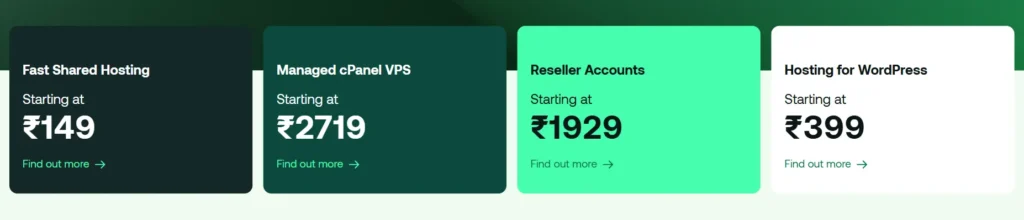
A2 Hosting’s newer shared plans usually sit around these ranges during promos:
- Starter: budget single-site plan
- Plus: slightly more storage and resources
- Pro: better performance for growing sites
- Max: highest shared tier
The newer hosting.com version also publishes resources more clearly, which I like.
But do not buy only because the first price looks cheap. Check:
- Renewal price
- Contract length
- Backup terms
- Domain renewal
- Email limits
- Storage limit
- Number of websites
- Refund policy
SiteGround Pricing

SiteGround’s intro pricing is attractive.
StartUp is cheap at signup. GrowBig is usually the best practical plan. GoGeek is powerful, but renewal pricing gets high.
The problem is simple: SiteGround renews expensive.
For a beginner, paying the intro price feels great. One year later, the same plan can cost much more. This is why SiteGround is not always the Best affordable hosting 2026 pick, even though it is one of the better beginner hosts.
Pricing Winner
A2 Hosting wins on pricing value.
SiteGround is better polished, but A2 Hosting gives more control and can be cheaper if you choose carefully.
A2 Hosting vs SiteGround Customer Support
Support is hard to judge because it changes by day, agent, and issue.
Still, there are patterns.
A2 Hosting Support
A2 Hosting support is helpful when you reach the right person. Technical issues like DNS, cPanel, SSL, migration, PHP settings, and caching are usually handled well.
But support can feel less polished than SiteGround. Sometimes you get fast help. Sometimes the answers feel more scripted.
Best for:
- cPanel issues
- Migration questions
- SSL setup
- WordPress errors
- Email setup
SiteGround Support
SiteGround support is usually better for beginners.
The agents are good at explaining WordPress issues in simple language. The dashboard also reduces support needs because many tools are easier to find.
The downside is that SiteGround sometimes pushes users toward help articles before live support. That can annoy you when your site is down.
Best for:
- WordPress setup
- Site migration
- Plugin conflicts
- Backups
- Staging
- Basic security issues
Support Winner
SiteGround wins support for beginners.
A2 Hosting is fine, but SiteGround feels smoother for non-technical users.
A2 Hosting vs SiteGround Security and Backups
Both hosts include the basics.
That means free SSL, malware protection, server monitoring, and backups.
A2 Hosting Security
A2 Hosting includes SSL, malware protection, DDoS protection, WAF features, and daily backups on newer plans.
This is solid for the price.
But you should still use:
- A strong WordPress security plugin
- Two-factor login
- Regular plugin updates
- Cloudflare or another DNS/CDN layer
- Offsite backups for serious sites
Never trust only host backups for a money-making site.
SiteGround Security
SiteGround includes daily backups, free SSL, CDN, proactive monitoring, and WordPress security tools. Its backup system is one of the reasons I like it for beginners.
On GrowBig and GoGeek, you also get on-demand backups, which are useful before plugin updates.
That feature is not glamorous, but it saves sites.
Security Winner
SiteGround wins for backup convenience.
A2 Hosting is strong, but SiteGround makes restore points easier for everyday users.
Migration Experience: Moving Your Site to A2 Hosting or SiteGround
Migration matters more than people think.
A bad migration can break email, images, redirects, permalinks, SSL, and database tables.
A2 Hosting Migration
A2 Hosting is easier if you are moving from another cPanel host. A full cPanel backup can move files, databases, emails, and settings with less manual work.
This is a real advantage.
If you have multiple small sites, A2 Hosting can be the smoother move.
SiteGround Migration
SiteGround offers a WordPress migrator plugin and professional migration options. The plugin works fine for many simple WordPress sites.
But if you have a messy site, custom database tables, large uploads, or email migration needs, you may want professional help.
Migration Winner
A2 Hosting wins for cPanel-to-cPanel migration.
SiteGround wins for simple WordPress migration.
Which One Is Better for Beginners?
SiteGround is better for beginners.
The dashboard is cleaner. WordPress setup is easier. Backups are easier to understand. Support feels more beginner-friendly. You do not need to know much about caching or server settings to get started.
A2 Hosting is not hard, but it expects you to be more comfortable with hosting basics.
Choose SiteGround if:
- This is your first website
- You want a simple WordPress setup
- You do not want to touch cPanel much
- You care about support
- You prefer clean tools over technical flexibility
Choose A2 Hosting if:
- You have used hosting before
- You like cPanel
- You want more technical control
- You want LiteSpeed
- You are trying to keep costs lower
Which One Is Better for Business and E-commerce?
For business websites, SiteGround is usually the safer choice.
For e-commerce, I would not use the cheapest plan from either host. WooCommerce needs more resources than a normal blog. It runs more database queries. It has carts, checkout pages, product filters, payment plugins, security plugins, and tracking scripts.
SiteGround GrowBig or GoGeek makes more sense for WooCommerce than StartUp.
A2 Hosting Pro or Max makes more sense than Starter.
My business pick:
- Small business brochure site: SiteGround StartUp or GrowBig
- Growing blog with ads and affiliate content: A2 Hosting Pro
- Small WooCommerce store: SiteGround GrowBig
- Developer-managed store: A2 Hosting Pro or VPS
- High-revenue store: Skip shared hosting and use managed cloud or VPS
Real-World Scenario: If I Had a $50 Budget for a Niche Blog
If I were starting a niche blog today with a $50 budget, I would pick A2 Hosting.
Not because SiteGround is bad.
Because a new niche blog needs value.
At the beginning, traffic is low. You are spending money on content, tools, images, keyword research, and maybe backlinks. Hosting should be fast enough, stable enough, and cheap enough.
A2 Hosting gives you more room to start without feeling trapped by a high renewal later.
My setup would be:
- Buy a basic A2 Hosting plan with a discount
- Install WordPress
- Use a lightweight theme like GeneratePress or Kadence
- Use LiteSpeed Cache
- Compress images
- Connect Cloudflare
- Avoid heavy page builders
- Upgrade only when traffic grows
For a beginner business website, I would choose SiteGround.
For a budget niche blog, I would choose A2 Hosting.
That is the difference.
Final Verdict: A2 Hosting vs SiteGround Winner for 2026
So, who wins A2 Hosting vs SiteGround in 2026?
Overall winner: SiteGround.
SiteGround wins because it is easier, cleaner, better for WordPress beginners, stronger for support, and more polished for business users. If someone asks me which host is safer for a first website, I would say SiteGround.
But this is not a total knockout.
A2 Hosting is the better value pick if you know what you are doing. It gives you LiteSpeed, cPanel-style control, solid speed potential, and better flexibility for technical users.
Here is the simple recommendation:
- Choose SiteGround if you want the easiest and safest WordPress experience.
- Choose A2 Hosting if you want better value, LiteSpeed, and more control.
- Choose SiteGround GrowBig for small business sites.
- Choose A2 Hosting Pro for niche blogs and affiliate sites.
- Avoid the cheapest plan from both if you are building WooCommerce.
Before buying, check current discounts. We track the latest deals for both providers; check our coupon section before you buy.
FAQs About A2 Hosting vs SiteGround
1. Does A2 Hosting offer a free domain?
Yes, newer A2 Hosting or hosting.com plans may include a free domain for the first year on selected annual plans. Always check the checkout page because domain offers can change by country, term, and promotion.
2. Is SiteGround good for WordPress?
Yes. SiteGround is one of the better WordPress hosts for beginners and small businesses. It includes managed updates, caching, free SSL, daily backups, CDN, and a clean dashboard. The main downside is renewal pricing.
3. Which is faster, A2 Hosting or SiteGround?
A2 Hosting can be faster when LiteSpeed Cache is configured properly. SiteGround is easier to optimize for beginners because caching and performance tools are already built into the platform. For technical users, A2 has more tuning potential.
4. Is A2 Hosting better than SiteGround for developers?
Yes, in many cases. A2 Hosting is better for developers who want cPanel, SSH, WP-CLI, Node.js, Python, and more server-level control. SiteGround has developer tools too, but its environment feels more controlled.
5. Which host is cheaper after renewal?
A2 Hosting is usually better for long-term value, but renewal prices change often. SiteGround has some of the steepest renewal jumps in shared hosting, so always check the regular monthly rate before buying.
6. Which one should I choose for WooCommerce?
Choose SiteGround GrowBig or GoGeek if you want easier WooCommerce management. Choose A2 Hosting Pro or Max if you want more control and can handle optimization yourself. Do not use the cheapest plan from either host for a serious online store.